Windows PowerShell 是比命令提示字元更強大的自動化管理殼層,Win7 旗艦版/企業版內建。以下提供兩種快速以**管理員身分**啟動的方法。
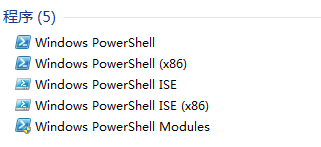
方法一:開始選單搜尋 (最直觀)
- 點擊「開始」按鈕 (或按 Win 鍵)。
- 在搜尋框輸入
Windows PowerShell。
- 搜尋結果中右鍵點選 「Windows PowerShell」 → 選擇 「以系統管理員身分執行」。
方法二:所有程式清單 (傳統路徑)
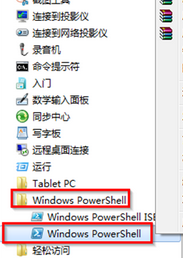
- 「開始」→「所有程式」→「附屬應用程式」。
- 展開 「Windows PowerShell」 資料夾。
- 右鍵點選 「Windows PowerShell」 → 「以系統管理員身分執行」。
補充:PowerShell 版本與升級
- Win7 SP1 內建 PowerShell 2.0。
- 強烈建議安裝 Windows Management Framework 5.1 (含 PowerShell 5.1),支援類別、模組自動發現、OneGet/Chocolatey 套件管理、DSC 期望狀態配置等現代功能。
- 下載連結:微軟官方下載中心搜尋 "WMF 5.1"。
適用版本
Win7 專業版/企業版/旗艦版內建;家用基礎版/家用高級版**不內建**,需手動安裝 WMF 套件。