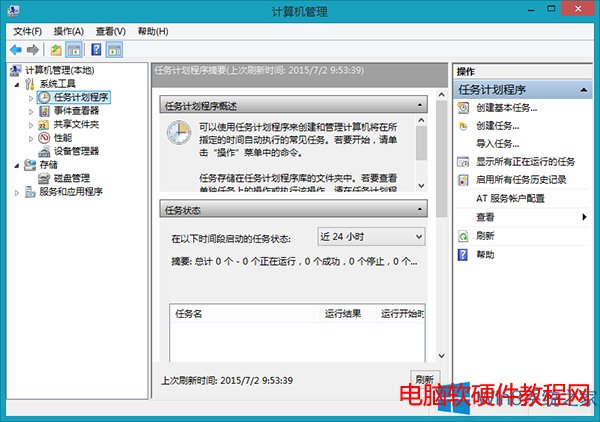
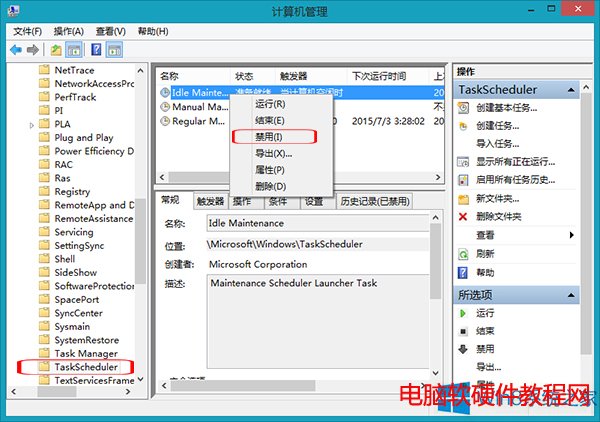
Win8 「自動維護」 (Automatic Maintenance) 會在電腦閒置時執行更新、掃描、診斷等工作,雖用意良好,但常在不當時機佔用大量 CPU/磁碟導致卡頓甚至死機。可透過工作排程器精準停用核心任務。
停用後系統不再自動執行閒置維護,建議改為手動定期執行 Windows Update 與掃描,掌控權回到使用者手中。
Win10 預覽版 Xbox 應用程式將採月度更新模式,深化桌面與主機整合
Windows 10 推出首日下載狂潮:頻寬佔用達 10 Tbps,遠超蘋果推送規模
Windows 10 將控制台、這台電腦、回收站等系統項目固定到工作列教學
XP系統下安裝Win7雙系統圖文教學:虛擬光碟掛載ISO、格式化D槽NTFS、自訂安裝保留XP
Windows 7 開機藍屏錯誤 C0000034 完整修復指南:四大方案逐步嘗試
Windows 7 64位元桌面「電腦」圖示不見?兩步驟找回系統圖示
Win7 看影片 CPU 狂飆 90%+?兩步驟關閉媒體優先排程機制徹底解決
WinXP 桌面資源回收筒圖示不見了?登錄編輯器找回法