Windows XP 區域連線屬性中有「速度」與「雙工」兩項設定值。雙工意指資訊可在兩點間雙向同時傳輸,如電話通話;對講機則為半雙工。
設定步驟:
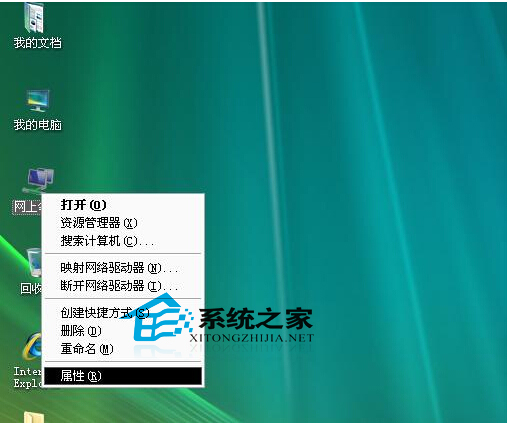
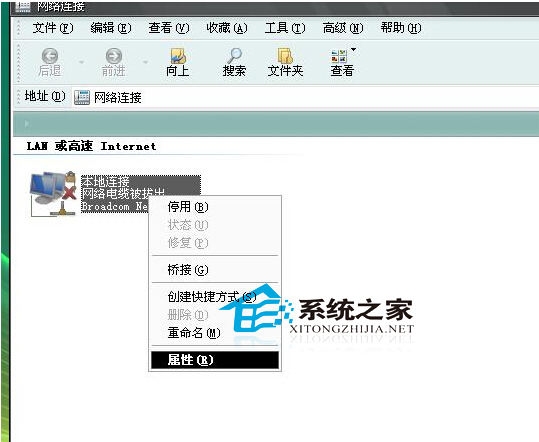
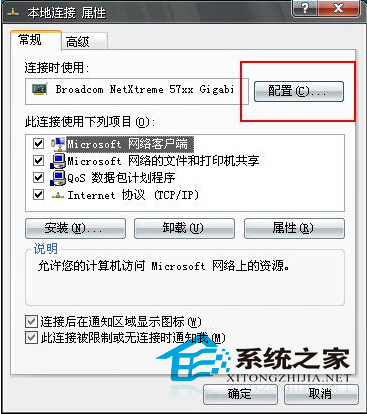
一般情況下無需更改,預設自動適應即為最佳速度。設定不當會導致裝置不相容、斷網。
Win10 預覽版 10558:PC 首度可安裝「電話」應用
Win10 WiFi/有線網路頻繁斷線?關閉網卡省電功能解決教學
Windows 8.1 將 SkyDrive 資料夾加入使用者程式庫:桌面重導向、OneNote 整合、共用筆記本至雲端三大應用場景
WinXP善用Total Commander快速建立檔案清單完整教學
Windows 8 Consumer Preview IE10 瀏覽器官方說明文件重點整理
Windows 8 家庭組功能使用教程:建立共享、修改高級設置
Win10 開機出現「Press F9 to start OneKey Ghost」兩大解法:OneKey 刪除啟動項、PE 環境重建 MBR