Win10 開機每次倒數顯示 「Press F9 to start OneKey Ghost. timeout: 2」,干擾開機流程。這是備份軟體 OneKey Ghost 寫入啟動磁區/啟動項導致。提供兩種移除方案。
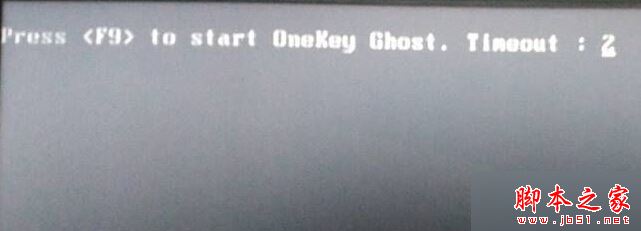
解法一:OneKey Ghost 官方工具刪除啟動項 (最簡單)
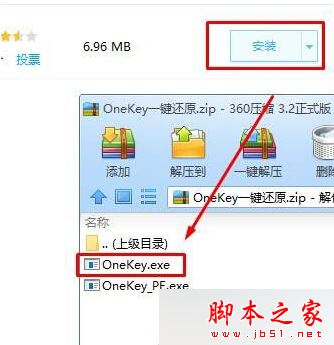
- 360 軟體管家搜尋下載「OneKey 一鍵還原」 (或官網下載)。
- 安裝/解壓後雙擊
OneKey.exe。
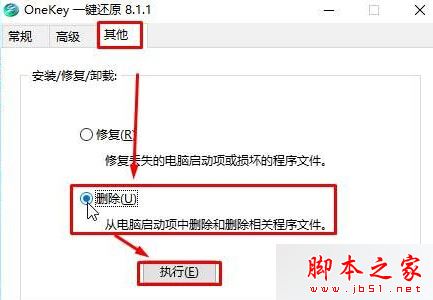
- 介面點「其他」→ 「刪除」→ 「執行」→ 杀毒軟體攔截選「允許」。
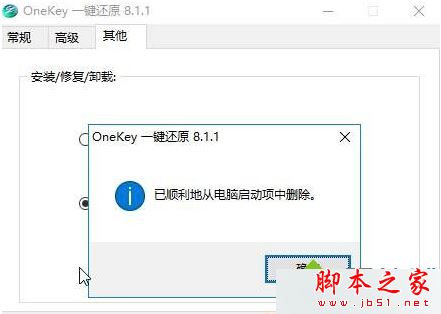
- 彈出「已順利從電腦啟動項中刪除」→ 確定 → 重開機驗證。

解法二:PE 環境用 DiskGenius 重建 MBR (徹底清除啟動磁區殘留)
- USB 啟動進入 PE (如微PE、伏羲 PE)。
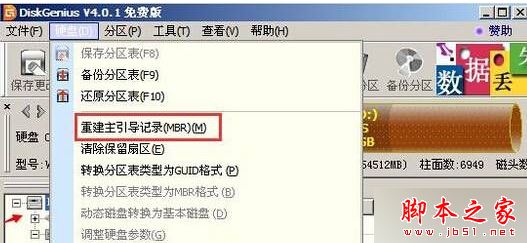
- 開啟 DiskGenius → 選目標硬碟 → 「重建主引導記錄 (MBR)」→ 確定 → 重開機。
適用場景:解法一無效、或系統無法進入桌面只能進 PE 時使用解法二。重建 MBR 會清除所有啟動磁區自定代碼,包含 OneKey Ghost、舊版 GRUB、惡意軟體啟動代碼等。
相關閱讀
移除後開機不再倒數,直接進入 Windows 載入畫面。