Windows 7 檔案總管支援「搜尋聯合提供者」,可將 Bing、Google、Yahoo、MSN Search 等搜尋引擎整合進總管右上角搜尋框。安裝後,在總管左側「收藏夾」下會出現對應搜尋連接器,輸入關鍵字即時顯示網路搜尋結果,無需切換瀏覽器。
操作步驟
- 瀏覽器開啟
https://www.sevenforums.com/tutorials/742-windows-7-search-federation-providers.html。
- 頁面列出多種現成搜尋連接器(.osdx 格式),點擊所需引擎圖示(如 Bing、Google)。
- IE 彈出「加入搜尋提供者」對話框,點擊「加入」。
- 回到檔案總管,左側「收藏夾」下出現新增的搜尋連接器圖示。
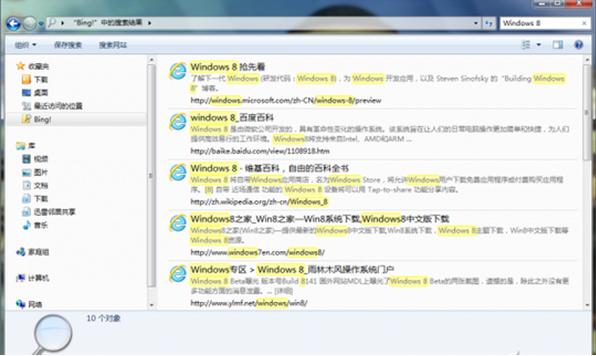
- 選中該連接器,右上角搜尋框輸入關鍵字,總管即時顯示遠端搜尋結果。

▲ SevenForums 提供的搜尋聯合提供者下載頁
▲ IE 彈出「加入搜尋提供者」確認對話框
進階應用
- 可重複上述步驟加入多個搜尋連接器(Bing、Google、Yahoo、Wikipedia 等)。
- 企業環境可自製 .osdx 指向內部 SharePoint/檔案伺服器搜尋端點,部署給員工。
- 搜尋結果呈現格式為 OpenSearch RSS/Atom,點擊結果會在預設瀏覽器開啟原始頁面。