若排除路由器問題,多為網卡「省電設定」導致。請依下列步驟關閉網卡省電功能:
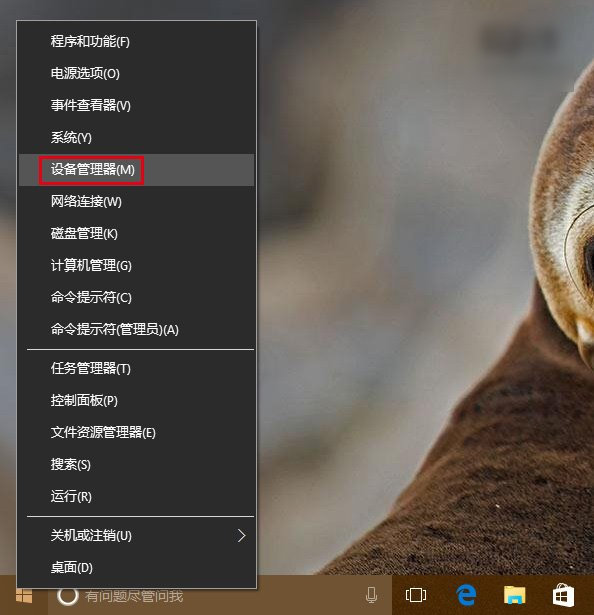
開始按鈕右鍵 → 「裝置管理員」。
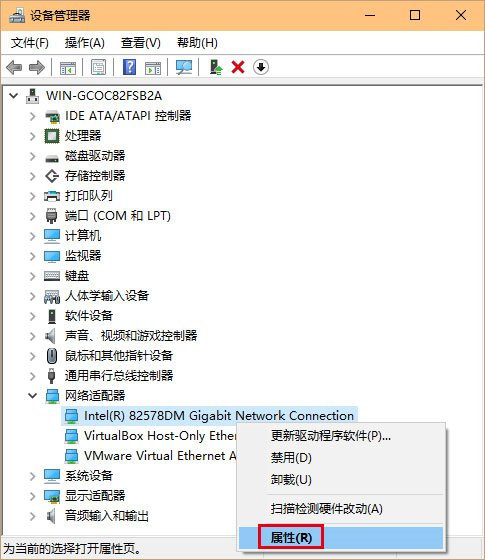
展開「網路介面卡」 → 右鍵有問題的乙太/無線網卡 → 「屬性」(或雙擊)。
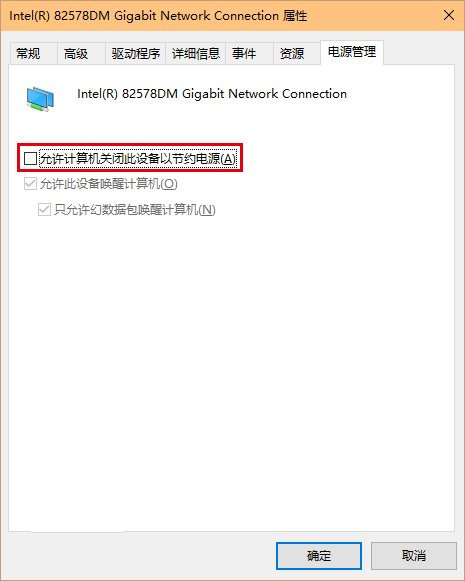
切換到「電源管理」索引標籤 → 取消勾選「允許電腦關閉此裝置以節省電源」 → 「確定」。
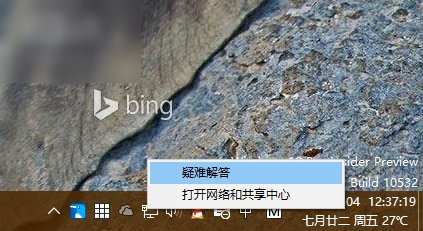
若問題持續,可能為路由器或驅動程式問題,可使用工作列網路圖示右鍵 → 「疑難排解」進一步診斷。
刪除 Windows 系統服務兩法:SC 指令與登錄編輯器
Win8 系統開機選項設定教學:加速啟動、識別完整記憶體、設定預設作業系統
WinXP 開機提示 Ntfs.sys 遺失或損壞 修復教學
Windows 10 自動更新太強勢?三種方法延緩或阻止強制更新(含家庭版方案)
Win10 升級後音響插孔無聲音?驅動與設定完整排查
Win10 10576 版 disksnapshot.exe 定時彈出 CMD 視窗解決:停用排程任務
Win10 關閉 Aero Shake (視窗搖晃最小化) 功能:群組原則一鍵停用教學
Win10 隱藏資料夾底部狀態列:資料夾選項→取消勾選「顯示狀態列」