Windows XP Windows 7 Windows 2003 Windows Vista Windows 綜合教學 Linux 系統教學
Windows 10 Windows 8 Windows 2008 Windows NT Windows Server 電腦軟體教學
您现在的位置: Windows教程網 >> Windows教程 >  >> Windows 綜合教學 >> 關於 Windows

Win7 透過登錄表禁用光碟燒錄功能:釋放資源防止誤操作

編輯:關於 Windows

隨著 USB 隨身碟、雲端儲存普及,光碟燒錄需求銳減。Win7 仍預設啟用 IMAPI 燒錄服務與介面,佔用少量資源且易誤觸發。透過登錄表新增 NoCDBurning 值可徹底禁用此功能。

操作步驟

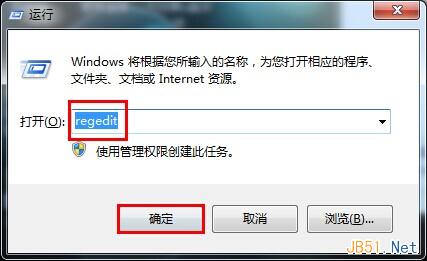
  1. 按 Win + R 輸入 regedit 開啟登錄表編輯器。
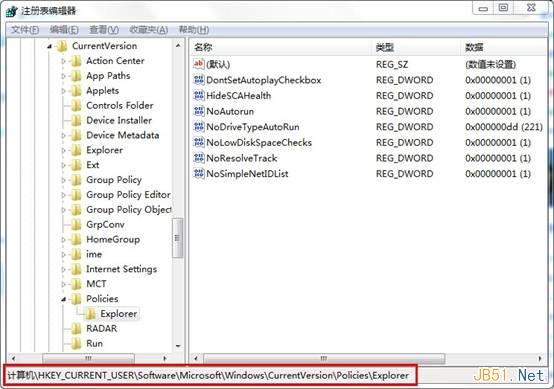
  2. 定位至:
    HKEY_CURRENT_USER\Software\Microsoft\Windows\CurrentVersion\Policies\Explorer
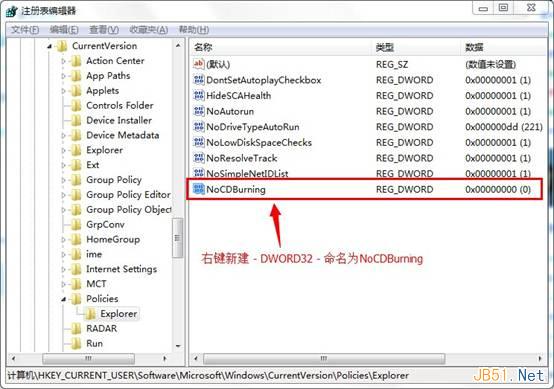
  3. 右鍵空白處 → 「新增」 → 「DWORD (32 位元) 值」,命名為 NoCDBurning。
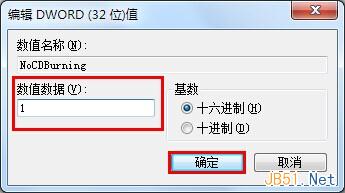
  4. 雙擊該值,將「數值資料」設為 1,確定。
  5. 重新登入或重啟電腦生效。此後右鍵光碟機無「燒錄」選項,檔案總管工具列亦隱藏燒錄按鈕。

若需恢復功能,刪除該值或將數值改為 0 即可。注意:此設定僅影響當前用戶,若需全機生效,請在 HKEY_LOCAL_MACHINE 同路徑下操作。

Copyright © Windows教程網 All Rights Reserved