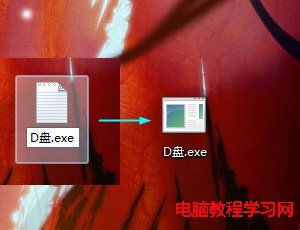
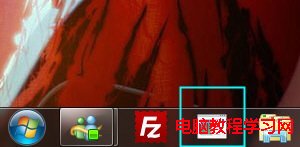
想像釘選應用程式一樣,把常用磁碟分區(如 D 槽)直接釘在工作列?利用「建立文字文件 → 改副檔名為 .exe → 釘選 → 修改屬性目標路徑」的小技巧即可實現。
D槽.exe
D:\
完成後點擊工作列圖示即直接開啟該分區,極大提升存取效率。
微軟詳述 Win10 正式版推送策略:分批推送、相容性檢查、OEM 標識
Win10 Build 9860 僅透過 Windows Update 推送,不提供 ISO 鏡像下載,大小約 2-2.7GB
Win10 工作管理員打不開?重啟 DWM 進程即可恢復
Windows 10 找回經典「Windows 相片檢視器」開啟圖片
Win10 Build 10136 最新截圖曝光:Edge 圖標正式啟用、系統圖標微調
Windows 7 修改視窗外觀顏色:自訂護眼綠背景、標題列色彩與透明效果完整教學
Win10 10061 升級後無法啟動?手動安裝 GVLK 金鑰透過 slmgr 指令啟動
Windows 8.1 內建郵件應用程式附件亂碼無法識別?語言/地區/輸入法設定排查