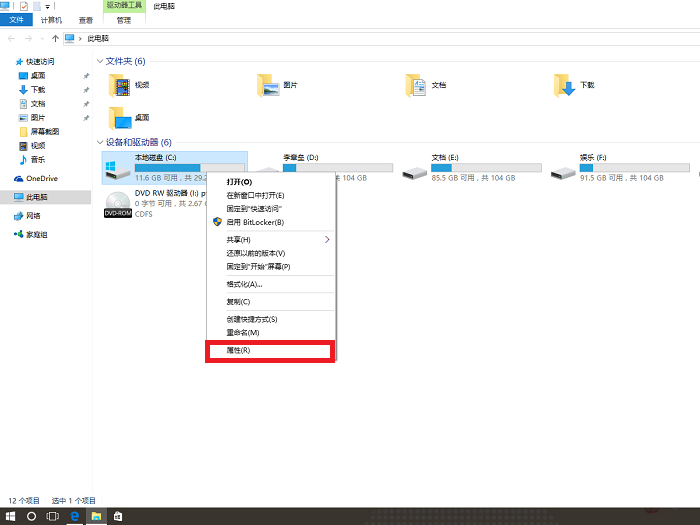
插入 USB 裝置時系統自動安裝驅動,若想從源頭阻擋(如防止未授權裝置),可利用 Windows 7 權限控制,拒絕 SYSTEM 對關鍵 INF 檔案的存取。
C:\Windows\inf(C 為系統盤),找到 usbport.PNF 與 usbstor.PNF。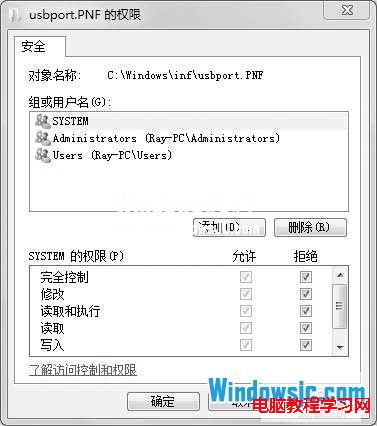
此法會導致所有使用者(含管理員)無法自動安裝 USB 驅動。建議:
• 為常用帳戶單獨授予「完全控制」允許。
• 僅對「Users」群組或「Everyone」設定拒絕。
達到「管理員可用、一般使用者受限」的彈性管控。
Win10 開始按鈕右鍵失效、超級選單不見?同樣是登錄 IsShortcut 缺失,修補即可恢復
Win7 旗艦版沒有 Aero 玻璃透明效果?五步驟檢查啟用完整教學
Win8 安裝 TL-WN725N 迷你無線網卡驅動完整教學:相容模式 XP SP3、僅安裝驅動、SoftAP 熱點分享設定
Windows 10 7 月 29 日正式發布,推出中國定制版,硬體需求、版本對應、定價一次看
Windows 10 仍需改進的 7 大痛點:檔案總管缺分頁、設定與控制台分裂、開始選單客製化不足...
Windows 10 隱藏工作列 Windows Defender 圖示:不影響防護功能
Win10 更新 KB3124263 失敗?關閉/卸載第三方殺毒 或 乾淨啟動 兩大標準解法
Win10 所有 .exe 無法開啟、提示「不支援此介面」?Restorator 2007 導致檔案關聯損毀,REG 修復一鍵解決