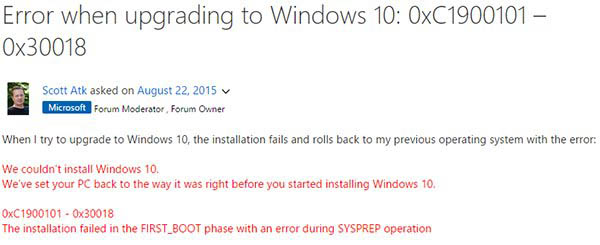
微軟指出:源於不相容軟體/驅動程式,包含:
相關廠商配合修復中。修復前建議嘗試:
sfc /scannow
另參考:Win8.1 升級 Win10 錯誤 0xc1900101-0x40017、Win7/Win8.1 升級 Win10 錯誤 0x80070002 解決方法。
Win10 Mobile 10572 快速設定更新推送體驗:定位推送管道、鎖屏延遲改善、低記憶體裝置升級順暢
Win10 乾淨安裝只需三步!Microsoft 官方「易升」工具一鍵完成
Win7 忘記 Wi-Fi 密碼怎麼辦?透過「無線網路內容」→「安全性」顯示字元找回
XP 系統提示 Baidusdsvc.exe 應用程式錯誤?移除重裝百度殺毒解決
Win10 預覽版如何徹底刪除 Windows.old 資料夾?磁碟清理法詳解
Win7/Win8.1/Win10 修改使用者登入名稱與顯示名稱完整教學
Windows 7 遊戲/程式無法全螢幕解決方案:修改登錄關閉顯示卡縮放
Win10 頻繁彈出「允許此應用對裝置進行變更」?降低 UAC 等級或關閉用戶帳戶控制