任務列右下角通知區域 (系統匣) 圖示全部消失,可透過修改登錄並重啟 Explorer 修復。
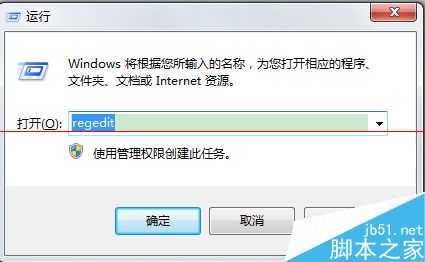
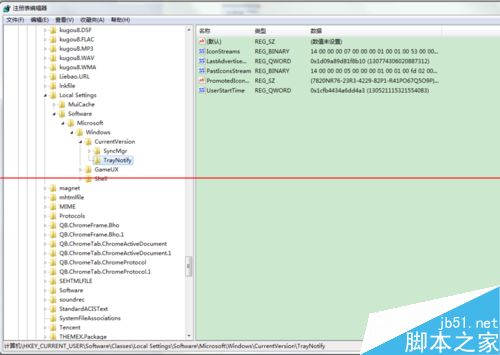
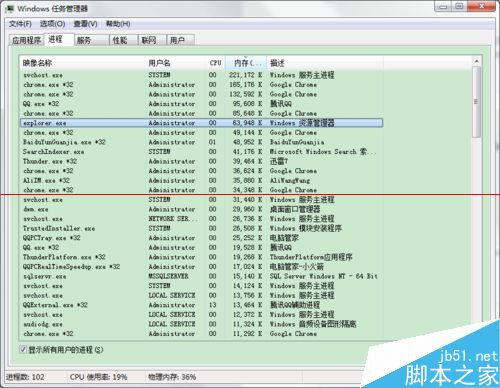
修復步驟:
regedit),定位至:HKEY_CURRENT_USER\Software\Classes\Local Settings\Software\Microsoft\Windows\CurrentVersion\TrayNotifyExplorer.exe 程序。Explorer.exe → 確定,通知區域圖示即恢復。Windows 10 正式版發布前微軟大規模清理應用商店:移除山寨/低品質應用、規範價格與關鍵字
Win10 Build 10041 上手體驗影片:透明開始選單、任務檢視、小娜中文化實測
Windows 10 使用 PowerShell 批量卸載所有 Metro 應用磚教學
Win10 掃描未簽名驅動程式?簽章驗證工具 sigverif.exe 圖文教學
Win10 應用商店閃退、小娜無回應?啟用 Network List Service 修復
Win10 10547 快速通道更新:開始功能表更強、Edge 即時通訊、平板分割優化
Win10 10525 升級 10532 失敗回滾錯誤 0x8007001F-0x20006?關閉 Hyper-V 解決