Windows XP Windows 7 Windows 2003 Windows Vista Windows 綜合教學 Linux 系統教學
Windows 10 Windows 8 Windows 2008 Windows NT Windows Server 電腦軟體教學
您现在的位置: Windows教程網 >> Windows教程 >  >> Windows 綜合教學 >> 關於 Windows

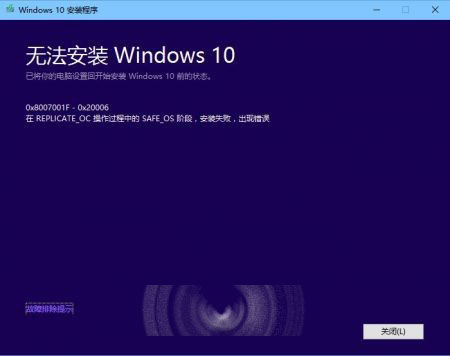
Win10 10525 升級 10532 失敗回滾錯誤 0x8007001F-0x20006?關閉 Hyper-V 解決

編輯:關於 Windows

Win10 10525 升級 10532 失敗:Hyper-V 新舊版本衝突導致

升級過程出現錯誤代碼 0x8007001F-0x20006,手動開啟 Hyper-V 後系統無法完成設定。
解決方法

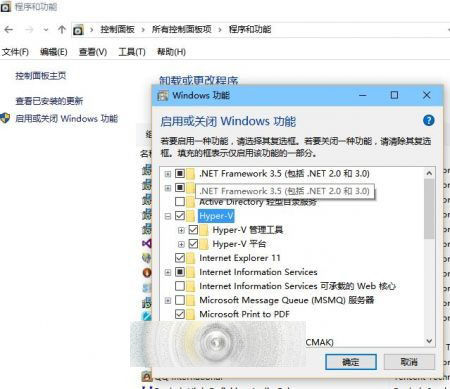
  1. 控制台 → 程式和功能 → 「啟用或關閉 Windows 功能」。
  2. 取消勾選 Hyper-V → 確定。
  3. 重新嘗試升級即可成功。

作者測試先移除 VMware Player 12、關閉 Hyper-V 後成功升級。升級完成後可重新啟用 Hyper-V (需重新設定虛擬機)。

相關推薦

Win10 10532 預覽版語言包官方下載位址匯總 (含 ar-sa、ca-es、cs-cz、de-de、en-gb、en-us、es-es、es-mx、fi-fi、fr-ca、fr-fr、hi-in、it-it、ja-jp、ko-kr、nl-nl、pl-pl、pt-br、ru-ru、sv-se 等 64 位元/32 位元連結)。

Copyright © Windows教程網 All Rights Reserved