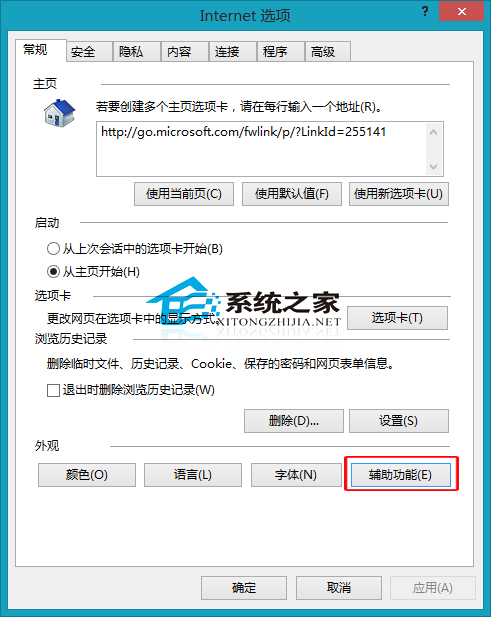
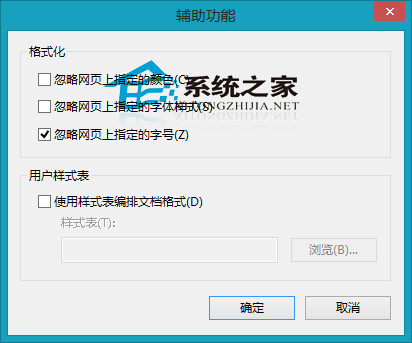
瀏覽不同網站字型大小不一造成閱讀困擾,IE 可強制統一字型:
若 IE 設定錯誤導致異常,可透過「重設 IE 設定」恢復預設。
Windows 10 將支援降級至原作業系統:免費升級用戶獲得「後悔藥」
Win8 開啟主題提示 MadobeYu.deskthemepack 無效?暫時切換日語地區修復
Win7 支付寶/數位憑證無法安裝?IE 安全性降級 + UAC 調低 + 註冊表修復完整解法
WinXP 聲卡驅動安裝完整圖文教學:裝置管理員手動更新法
Windows 7 禁止登錄編輯器被修改:群組原則鎖定 Regedit 保護系統設定
Win7 遠端連線管理服務啟動失敗:重啟三大核心服務 (RasMan/Netman/TapiSrv) 解決
Windows 10 取消開機登入密碼兩大法圖文教學:netplwiz 與來賓帳戶法
Windows 7 開啟工作管理器三種快速鍵與方法圖解