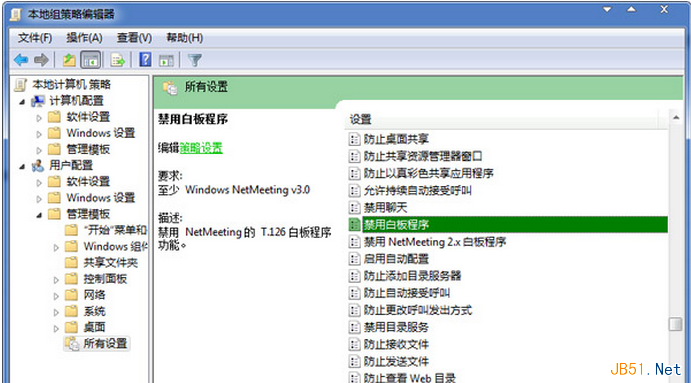
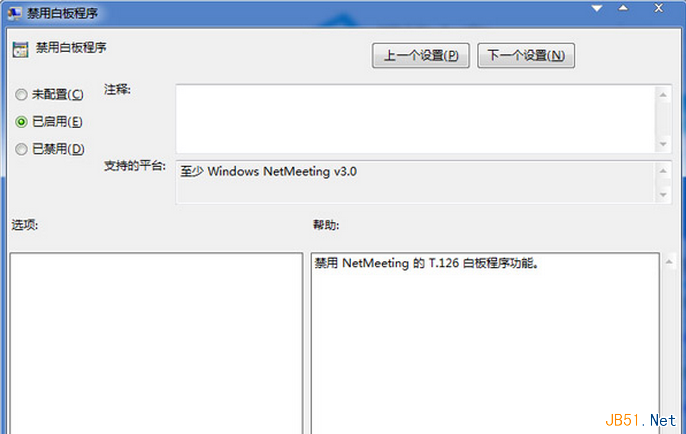
Win7 內建 NetMeeting 聊天軟體,白板功能鮮用。停用:
gpedit.msc
白板功能即停用,不影響文字/視訊聊天。
Win10 如何升級至 Build 9879?多種安裝方式說明
Win8/8.1 滑鼠右鍵卡頓/無回應:登錄表清理 ContextMenuHandlers 徹底解決
Win10 Windows Hello 臉部辨識登入怎麼設定?需專用硬體支援
Windows 7 設定鎖定阈值防暴力破解:輸入錯誤密碼達標自動鎖定電腦
Windows Server 2003 將於 7 月 14 日停服:想繼續用需付費
Windows 7 旗艦版 EFS 加密檔案/資料夾解密教學:屬性進階取消加密屬性
微軟釋出 Windows 10 Build 9926 兩款累積更新:KB3038357、KB3037975
Win8 關閉無線網路 (WLAN) 兩大法:省資源、增續航