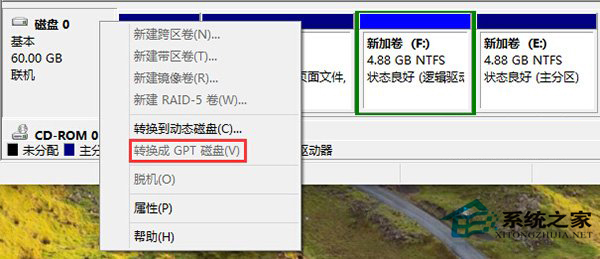
Win8 系統啟動模式 (UEFI/BIOS) 與安裝相關,確認三法:
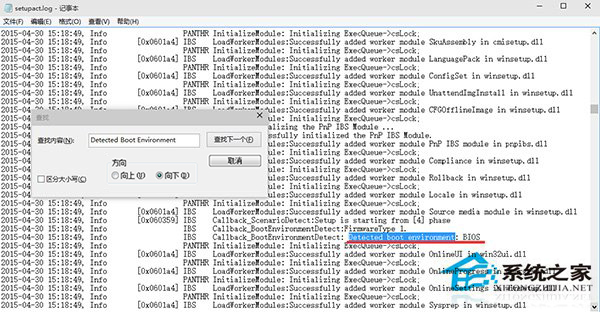
C:\Windows\Panther\setupact.log
Detected Boot Environment
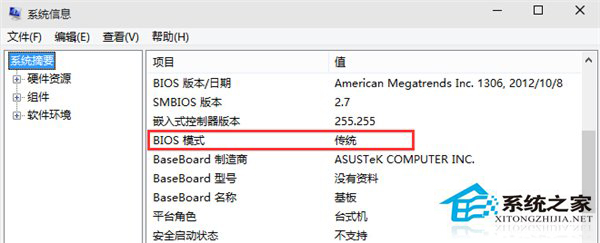
msinfo32
傳統
UEFI
建議用後兩法,簡單直觀。
Win7 釋放 20% 預留頻寬加快網速:群組原則關閉 QoS 封包排程器限制
Windows 10 防火牆關閉教學:控制台 → Windows 防火牆 → 啟用或關閉 → 選擇關閉
Win10 升級 10166 版出現錯誤 0X80310052 解決辦法
重裝 Windows 8 後無法解鎖 BitLocker 加密磁碟?使用 manage-bde 指令搭配復原金鑰解鎖
Windows 7 如何啟用 TFTP 伺服器功能?完整設定圖文教學
Win8 開啟/關閉 InPrivate 隱私瀏覽完整教學(含捷徑建立法)
Windows 7 睡眠模式下持續下載:啟用「離開模式」完整教學
Win7 如何關閉硬體加速解決影片播放花屏?顯示卡設定調整或驅動面板關閉