Windows XP Windows 7 Windows 2003 Windows Vista Windows 綜合教學 Linux 系統教學
Windows 10 Windows 8 Windows 2008 Windows NT Windows Server 電腦軟體教學
您现在的位置: Windows教程網 >> Windows教程 >  >> Windows 綜合教學 >> 關於 Windows

Win8/8.1 滑鼠右鍵卡頓/無回應:登錄表清理 ContextMenuHandlers 徹底解決

編輯:關於 Windows

Win8/8.1 常見右鍵選單延遲、卡頓、甚至無回應,主因是第三方軟體(壓縮軟體、雲端同步、殺毒軟體等)在 ContextMenuHandlers 註冊過多殘留項目。清理登錄表即可恢復順暢。

核心解決步驟

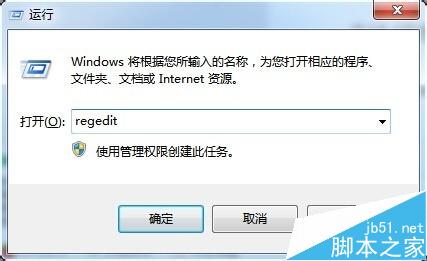
  1. 按 Win+R > 輸入 regedit > Enter
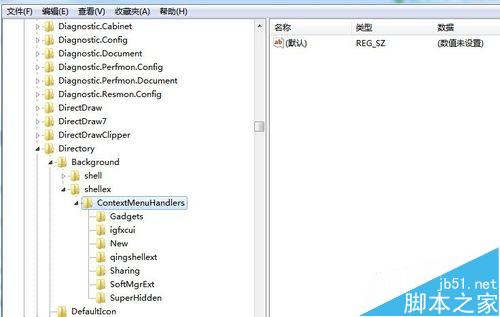
  2. 定位路徑:
    HKEY_CLASSES_ROOT\Directory\Background\shellex\ContextMenuHandlers
  3. 刪除該機碼下所有子機碼(資料夾圖示項目)
  4. 重新開機或重新啟動 explorer.exe 生效

執行 regedit

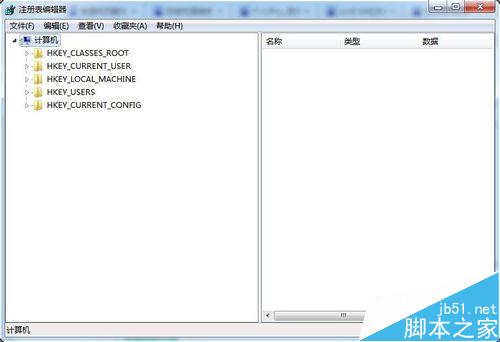
登錄表編輯器

ContextMachineHandlers 刪除示範

副作用修復:右鍵「新增」選單遺失「資料夾」選項

若清理後右鍵 > 新增 缺少「資料夾」,請手動重建:

  1. 定位:HKEY_CLASSES_ROOT\Directory\Background\shellex\ContextMenuHandlers\New
  2. 右側空白處右鍵 > 新增 > 字串值
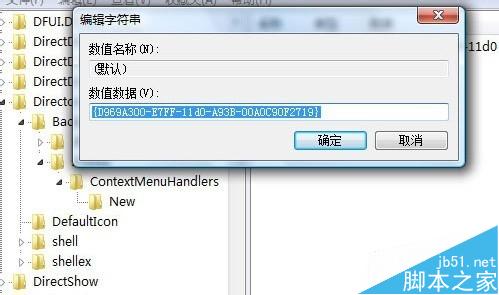
  3. 名稱保留預設 > 數值資料輸入:{D969A300-E7FF-11d0-A93B-00A0C90F2719}
  4. 重開機生效

重建 New 字串值

預防建議

  • 安裝軟體時取消勾選「整合至右鍵選單」等選項
  • 定期使用「軟媒魔方」、「CCleaner」等工具掃描清理右鍵殘留
  • 僅保留常用項目(如 7-Zip、Git、VS Code 等)

登錄表手術刀,精準切除右鍵卡頓病灶。

Copyright © Windows教程網 All Rights Reserved