習慣 XP、Win7 防火牆設定的使用者,初次接觸 Windows 10 可能找不到入口。本文詳細說明 Win10 防火牆的開啟、關閉步驟,並附上圖示引導。
開啟防火牆設定頁面
- 點擊「開始」→「控制台」(或在搜尋列輸入「控制台」)。
- 將右上角「檢視模式」改為「小圖示」。
- 找到並點擊「Windows Defender 防火牆」。
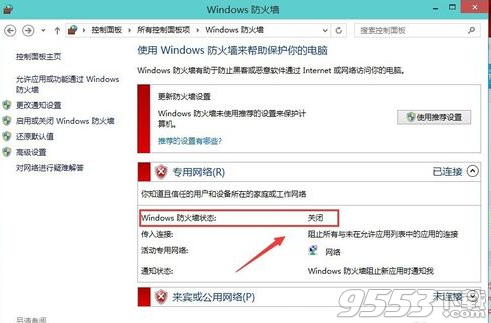
關閉防火牆(不建議長期關閉)
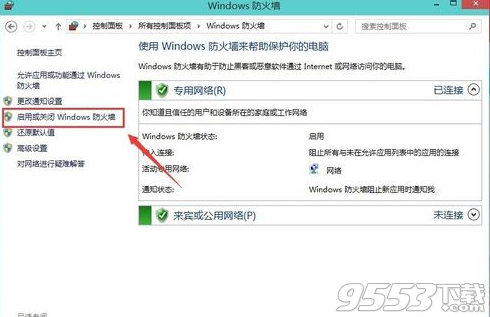
- 在左側選單點擊「開啟或關閉 Windows Defender 防火牆」。
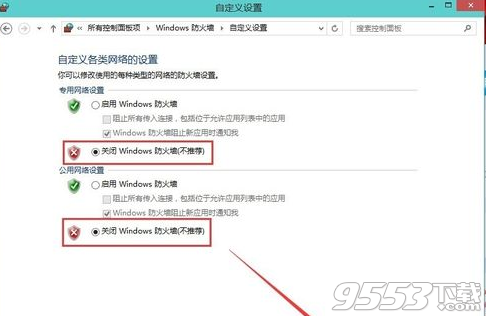
- 分別針對「私人網路設定」與「公用網路設定」,勾選「關閉 Windows Defender 防火牆(不建議)」。
- 點擊「確定」套用。
確認狀態
返回防火牆主頁,狀態欄將顯示「Windows Defender 防火牆已關閉」。
提醒:關閉防火牆會降低系統安全性,建議僅在測試特定網路問題時暫時關閉,完成後務必重新開啟。