Windows XP Windows 7 Windows 2003 Windows Vista Windows 綜合教學 Linux 系統教學
Windows 10 Windows 8 Windows 2008 Windows NT Windows Server 電腦軟體教學
您现在的位置: Windows教程網 >> Windows教程 >  >> Windows 綜合教學 >> 關於 Windows

Win10 群組原則禁止使用者安裝軟體,鎖定企業/共用電腦環境

編輯:關於 Windows

企業或共用電腦環境需防止使用者隨意安裝軟體,Win10 專業版/企業版可透過群組原則啟用「禁止使用者安裝」,封鎖 Windows Installer (.msi) 執行,強化軟體管控。

設定步驟

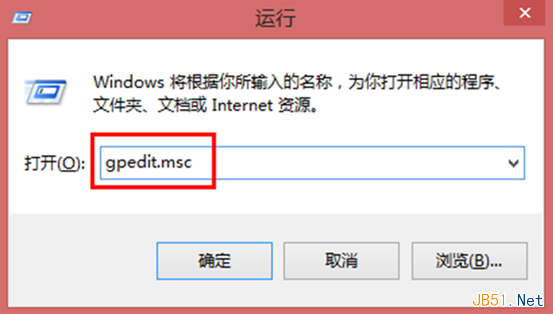
  1. 按 Win+R 輸入 gpedit.msc 開啟本機群組原則編輯器。
  2. 依序展開:
    電腦設定 → 管理範本 → Windows 元件 → Windows Installer
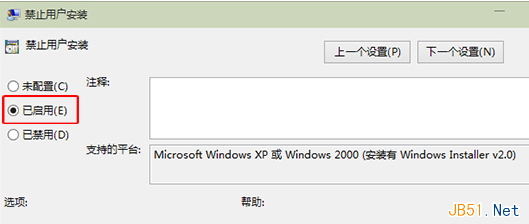
  3. 右側雙擊 「禁止使用者安裝」。
  4. 選擇 「已啟用」 → 「確定」套用。
  5. 執行 gpupdate /force 或重新開機生效。

執行 gpedit.msc

Windows Installer-禁止使用者安裝已啟用

效果與限制

  • 生效範圍:封鎖 .msi 安裝套件、Windows Update 驅動安裝、Microsoft Store 應用安裝 (視版本而定)。
  • 例外處理:系統管理員仍可安裝;可搭配「允許使用者安裝受信任的發行者」白名單機制。
  • 家用版無效:Win10 家用版無 gpedit.msc,需升級專業版或使用註冊表修改:
    HKEY_LOCAL_MACHINE\SOFTWARE\Policies\Microsoft\Windows\Installer\DisableMSI = 1 (DWORD)

企業部署建議

搭配 AppLocker (應用程式鎖定器) 實現更精細的執行檔規則控管 (路徑、雜湊、發行者),透過群組原則統一部署至全域電腦,構建完整軟體管控體系。

Copyright © Windows教程網 All Rights Reserved