Windows XP Windows 7 Windows 2003 Windows Vista Windows 綜合教學 Linux 系統教學
Windows 10 Windows 8 Windows 2008 Windows NT Windows Server 電腦軟體教學
您现在的位置: Windows教程網 >> Windows教程 >  >> Windows 綜合教學 >> 關於 Windows

Win10 代理伺服器連線失敗?電腦管家一鍵修復教學

編輯:關於 Windows

解決方法:使用電腦管家「電腦診所」修復

  1. 開啟電腦管家類軟體(如騰訊電腦管家、360 安全衛士等)
  2. 點擊「工具箱」或「工具」選項
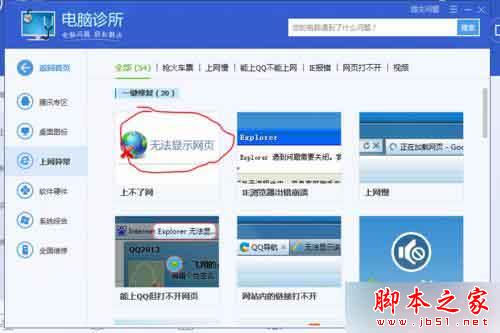
  3. 選擇「電腦診所」→「上網異常」
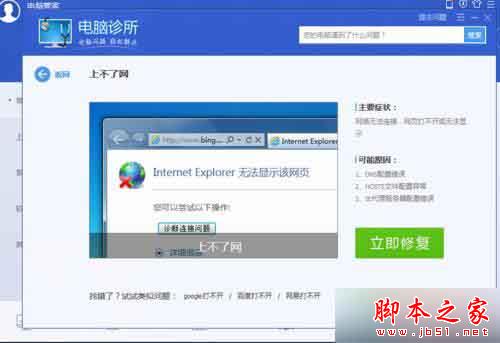
  4. 選擇「無法顯示網頁」,點擊「立即修復」
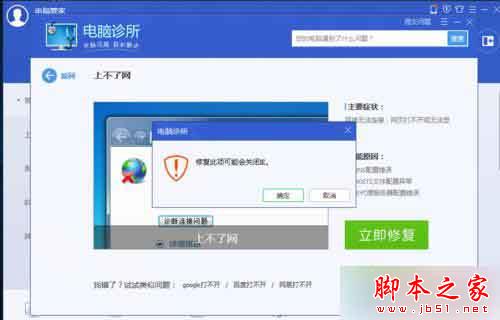
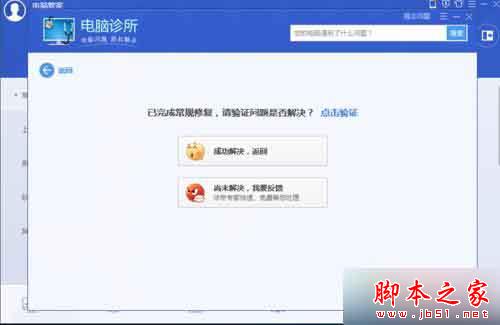
  5. 確認彈出選項,等待進度條完成,彈出成功對話框
  6. 修復完成後重新啟動瀏覽器即可

相關閱讀

  • Win7 升級 Win10 後 IE 和 Edge 瀏覽器無法觀看影片解決法
  • Win10 連接行動硬碟無法存取「位置不可用」「參數錯誤」解決法

依照上述步驟逐步操作,即可解決 Windows 10 代理伺服器連線失敗問題。

Copyright © Windows教程網 All Rights Reserved