電腦進入睡眠模式後喚醒,預設可直接進入桌面,若在公共場合或共用電腦,隱私易外洩。Windows 10 內建「喚醒時要求登入」選項,啟用後需輸入密碼、PIN 碼或 Windows Hello 才能繼續使用,大幅提升安全性。以下教你快速設定。
設定步驟
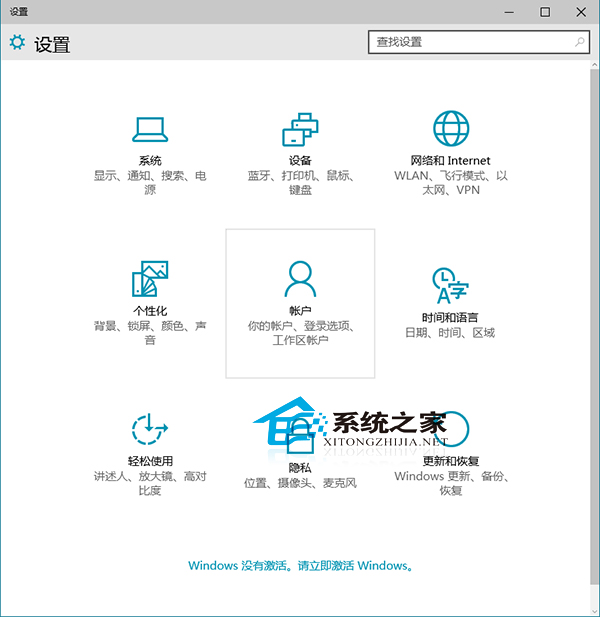
- 按 Win + I 開啟「設定」應用程式。
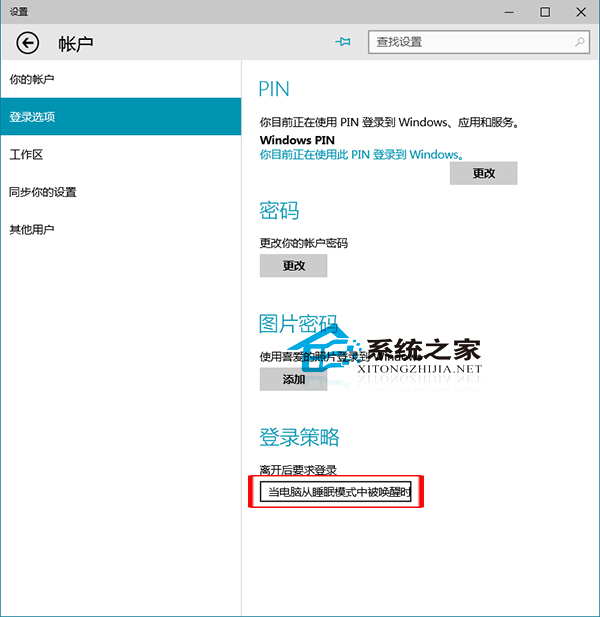
- 點選「帳戶」→ 左側選單「登入選項」。
- 在「登入時機」區塊,找到 當電腦從睡眠模式喚醒時 下拉選單,選擇「每次都要登入」。
- (建議)同頁面設定 PIN 碼或 Windows Hello 人臉/指紋辨識,兼顧便利與安全。
進階技巧
- 若使用筆電,可在「電源與睡眠」設定合上蓋幕動作為「睡眠」,合上螢幕即自動鎖定。
- 搭配 Win + L 快速鎖定鍵,離位前一按即安心。
- 企業版用戶可透過群組原則強制部署此設定,路徑:
電腦設定 → 管理範本 → 系統 → 電源管理 → 睡眠設定。