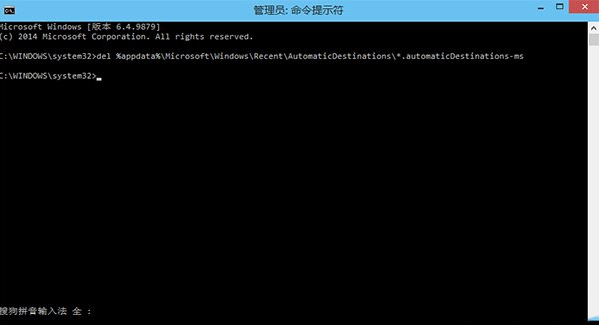
Win10 檔案總管「主頁」會記錄常用資料夾/檔案,久而久之暴露隱私。一鍵重置:
CMD
del %appdata%\Microsoft\Windows\Recent\AutomaticDestinations\*.automaticDestinations-ms
定期執行可保護隱私,保持主頁整潔。
Win10 如何刪除內建「王碼五筆」輸入法?控制台語言設定中移除頑固項目
Windows 10 如何查看電腦硬體配置
Windows 7 系統還原教學:備份與還原中心還原至先前還原點
Windows 7 耳麥無聲音排查六步驟:硬體、驅動、設定、插孔全面檢查
Win10 Spartan 瀏覽器全螢幕瀏覽網頁:更多選項→全螢幕一鍵切換
Windows 10 Build 10041 已知音訊問題彙總與解決方案
Win7 筆電電源計畫完整指南:三種切換方式、自訂計畫、行動中心整合
Windows 10 開啟 ISO 鏡像檔完整教學:虛擬光碟機 Daemon Tools Lite 圖文詳解