Win10 開始選單應用右鍵選單含「解除安裝」選項,點擊直接開啟控制台「程式和功能」的「解除安裝或變更程式」視窗,屬快捷方式而非原地解除安裝,但較傳統逐層開啟控制台更便捷。
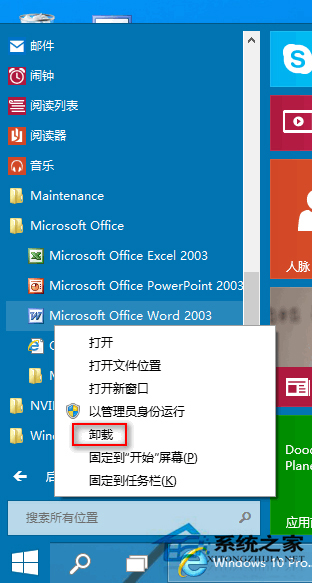
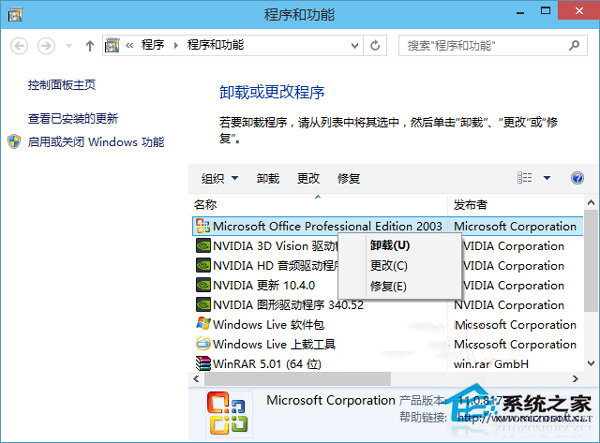
步驟:開始選單右鍵應用 →「解除安裝」→ 控制台視窗選程式 → 點上方或右鍵「解除安裝」。雖非直接移除,但省去多層點擊,效率提升。
VMware Workstation 安裝 Win10 虛擬機完整圖文:從新建虛擬機到桌面就緒
Win7 插入 USB 隨身碟無「修復」提示?四大排查方向教學
Win10 關閉「Windows 更新」通知訊息:兩步驟即時靜音
下載:DirectX 12 官方提取安裝包 Win7/8.1 也能裝
Windows 7 忘記密碼進階解決方案:利用 Sticky Keys (利用管理員功能) 替換法啟用內建 Administrator / 建立新管理員帳戶
32 位元 vs 64 位元作業系統:記憶體 4GB 是分水嶺,別盲目追 64 位
Windows 10 TH2 正式版 USB 安裝完整圖文教學:軟媒 USB 開機製作、BIOS 設定、分區選擇、個人化設定全流程