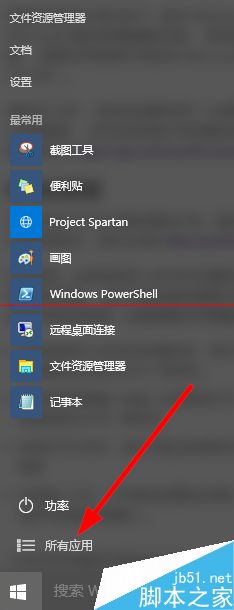
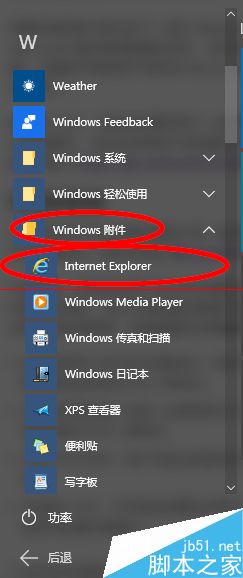
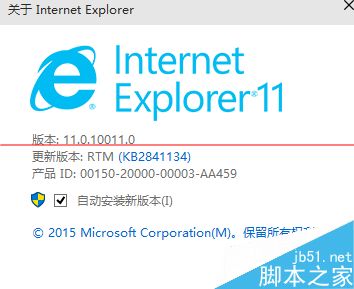
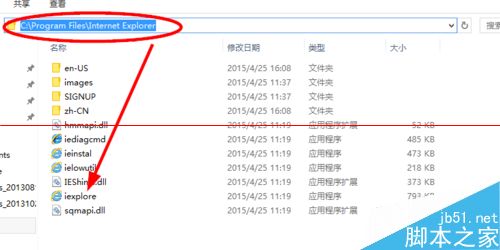
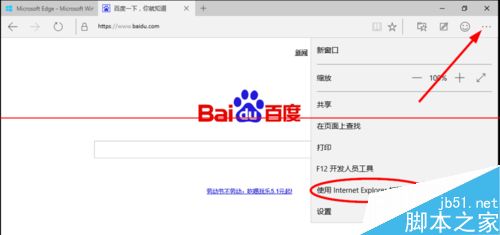
Windows 10 預設瀏覽器為 Microsoft Edge,IE 11 保留於系統但隱藏較深。三種快速開啟方式:
C:\Program Files\Internet Explorer\
iexplore.exe
建議: 常用者可將 IE 釘選至工作列或開始選單,或依先前文章建立桌面捷徑。Edge 相容性較佳,僅在舊版企業內部系統需 ActiveX/Java Applet 時使用 IE。
Windows XP 控制台部分功能自動關閉無法使用?註冊元件、安全模式修復、系統檔案掃描三大修復方案
Win10 安裝與升級完整指南:推送升級、ISO/U 盤安裝、官方工具、MD5 驗證、磁碟清理
Windows 7 連線至工作區 (VPN) 完整圖文設定教學
Windows 10 快速存取常用資料夾記錄怎麼清除?CMD 一鍵重置隱私保護
Win10 開始選單動態磁貼引用戶不滿:數百人反饋要求提供隱藏/移除選項,還原 Win7 純淨體驗
Win8 Metro 介面磁貼分組命名教學:讓開始畫面井井有條
Win10 預覽版 10558 上手體驗影片:右鍵選單、Edge 改版、應用安裝位置變更
Win10 外接光碟機放入光碟無反應?自動播放設定 + 播放器關聯一鍵修復