Windows 10 檔案總管「快速存取」會自動記錄常用資料夾,時間久了既臃腫又有隱私疑慮。一條 CMD 指令即可徹底清除記錄:
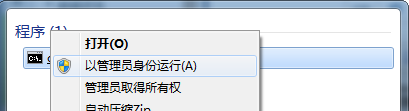
CMD,右鍵「命令提示字元」→「以系統管理員身分執行」。del %appdata%\Microsoft\Windows\Recent\AutomaticDestinations\*.automaticDestinations
%AppData%\Microsoft\Windows\Recent\AutomaticDestinations 目錄下所有 .automaticDestinations 檔案,即為快速存取的常用資料夾記錄資料庫。定期清理快速存取記錄,兼顧介面整潔與隱私保護。
Win7 無法安裝在 C 槽?C 槽非 NTFS 格式導致,convert 指令或重新分區解決
Windows 10 Mobile 10.0.12609.0 新版本曝光:編譯號首進 126xx 系列,手機版預計 10 月發布
WinXP 手動清除無線網路設定檔:網路連線屬性→無線網路組態→刪除優先網路
Win10 啟用/停用 ClearType 字型平滑:個人化→顯示→調整 ClearType 文字、取消勾選啟用 ClearType
Windows 10 Mobile 10512 圖賞:動畫更流暢、語音下載修復、TH2 分支新面貌
Win10 顯卡驅動修改後失去數位簽章怎麼安裝?停用強制簽章驅動完整教學