Windows XP Windows 7 Windows 2003 Windows Vista Windows 綜合教學 Linux 系統教學
Windows 10 Windows 8 Windows 2008 Windows NT Windows Server 電腦軟體教學
您现在的位置: Windows教程網 >> Windows教程 >  >> Windows 綜合教學 >> 關於 Windows

Windows 7 旗艦版 64 位元無法進入安全模式?透過註冊表匯入修復教學

編輯:關於 Windows

Windows 7 遇到系統故障時,安全模式是重要修復手段。但部分用戶發現無法透過 F8 進入安全模式。本文提供透過正常 Windows 7 系統匯出安全模式註冊表鍵值,移植至故障電腦的修復方案。
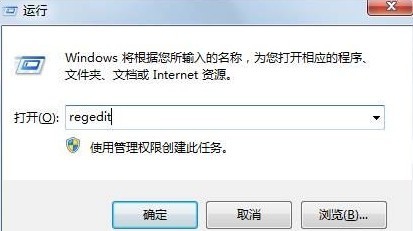
修復步驟

  1. 在另一台正常的 Windows 7 電腦,按 Win+R 輸入 regedit 開啟登錄編輯器。
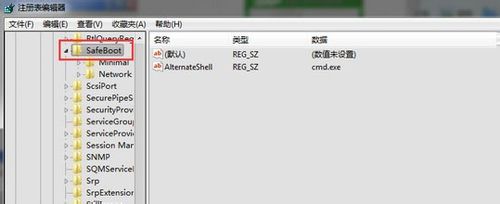
  2. 展開路徑:HKEY_LOCAL_MACHINE\SYSTEM\CurrentControlSet\Control\SafeBoot。
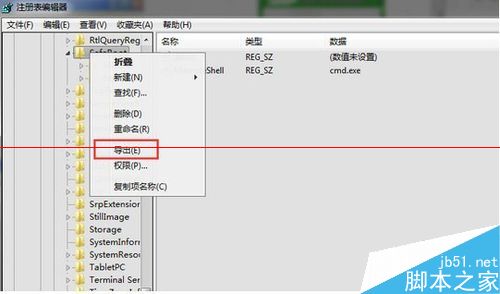
  3. 右鍵點選 SafeBoot → 「匯出」,儲存為 .reg 檔案。
  4. 將該檔案複製至 USB 隨身碟,插入故障電腦。
  5. 在故障電腦上雙擊該 .reg 檔,確認匯入提示視窗選擇「是」→「確定」。
  6. 重新啟動電腦,嘗試以 F8 進入安全模式。

注意:此方法需有一台相同版本(旗艦版 64 位元)的正常 Windows 7 系統作為來源。若無可用電腦,建議改用 Windows 安裝媒體進入修復環境處理。

Copyright © Windows教程網 All Rights Reserved