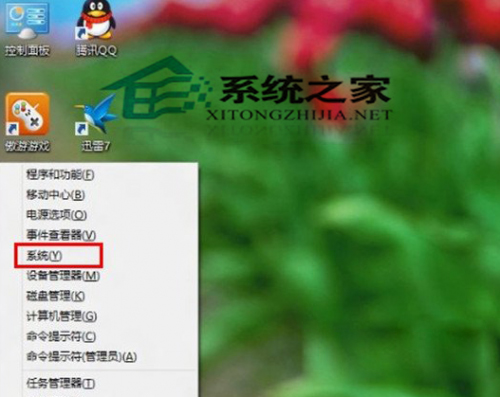
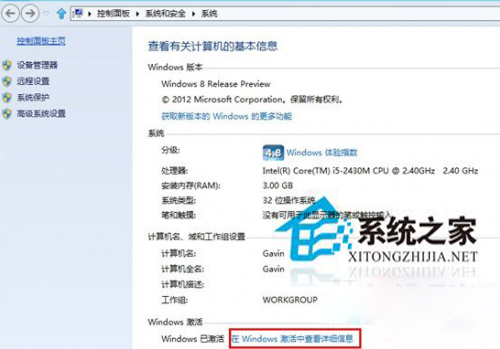
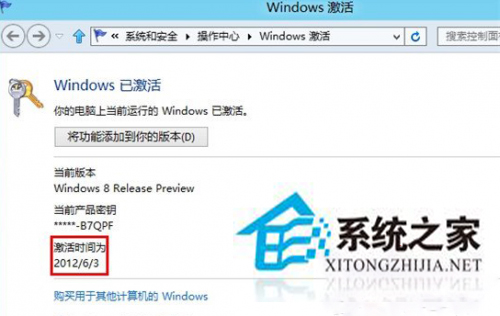
判斷 Windows 8 是否為正版授權,最簡單方法為查看啟用時間。正版會顯示具體啟用日期時間,盜版通常不顯示或顯示異常。
Win10 更新失敗 0x80240442?重置 Windows Update 元件一鍵修復
Win10 如何安裝 12306 根憑證?圖文教學確保購票無憂
電腦 CPU 使用率飆高至 100% 完整排查指南:進程定位、病毒查殺、驅動認證、防毒軟體調整、Svchost 分析
Win10 1607 預覽版右鍵「開啟方式」選美圖秀秀無反應?兩招設定預設程式修復
Win10 開機藍畫面 0x00000050?乾淨啟動排除第三方服務/啟動項衝突
Win7 資料夾捲軸跑到右側怎麼辦?改用「清單」檢視模式即可歸位底部