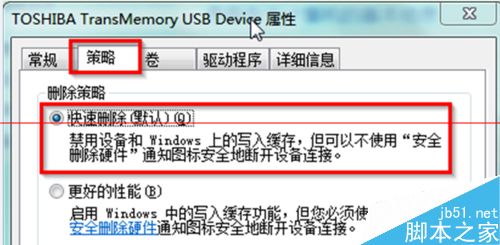
Win7 移動硬盤明明關閉所有視窗仍提示「裝置正在使用」,原因可能為資料殘留剪貼簿、防毒軟體掃描等。
設定後可直接拔除移動硬碟/隨身碟無需安全移除程序,避免誤判「正在使用」錯誤。
Win 10 正式版 10240 更新包 KB3074683 官方下載:含 1GB 以上更新內容
WinXP 系統如何開啟 STP 檔案?CAD 三維模型檔案開啟完整教學
Windows 7 關閉系統檔案保護功能:SFC 掃描修復與群組原則禁用教學
Win10 正式版預設瀏覽器無法在瀏覽器內修改?必須在系統設定→預設應用程式→Web 瀏覽器變更
Win7 資料夾小黃鎖怎麼移除?權限設定教學
Windows 10 Build 10240 發行說明提前洩露:17 頁文檔詳列變更與已知問題
Win10 當機無回應怎麼辦?Ctrl+Alt+Del → 按住 Ctrl 點「電源」→「緊急重新開機」最小化損害
Windows XP 如何徹底移除 GoogleUpdate.exe 背景程序?刪除排程任務即可根治