Windows XP Windows 7 Windows 2003 Windows Vista Windows 綜合教學 Linux 系統教學
Windows 10 Windows 8 Windows 2008 Windows NT Windows Server 電腦軟體教學
您现在的位置: Windows教程網 >> Windows教程 >  >> Windows 綜合教學 >> 關於 Windows

WinXP 系統如何開啟 STP 檔案?CAD 三維模型檔案開啟完整教學

編輯:關於 Windows

STP(STEP)檔案為國際標準(ISO 10303)產品模型資料交換格式,廣泛應用於 CAD 三維設計,因相容性佳、轉檔資料損失少而備受青睞。本文教您在 WinXP 系統下使用 Pro/ENGINEER 開啟 STP 檔案。

軟體準備

建議使用 Pro/ENGINEER Wildfire 5.0(中文版):
  • 軟體大小:311.44 MB
  • 更新時間:2014-04-07

Pro-E 軟體資訊

開啟步驟

  1. 安裝完成後啟動 Pro-E 軟體
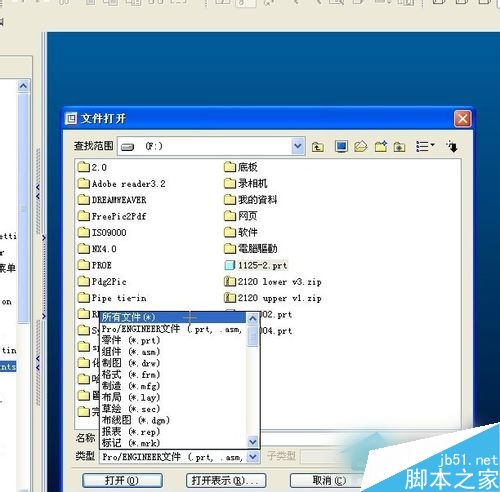
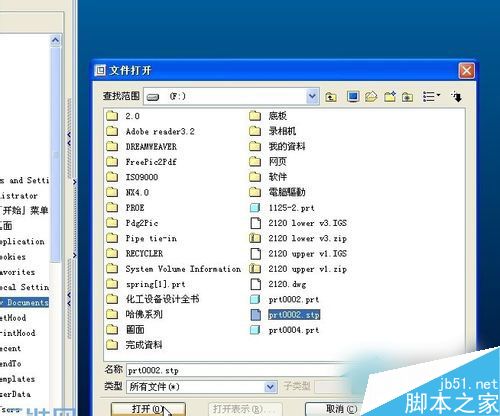
  2. 選擇 檔案 → 開啟,將檔案類型改為 所有檔案 (*.*)
  3. 選取目標 .stp 檔案
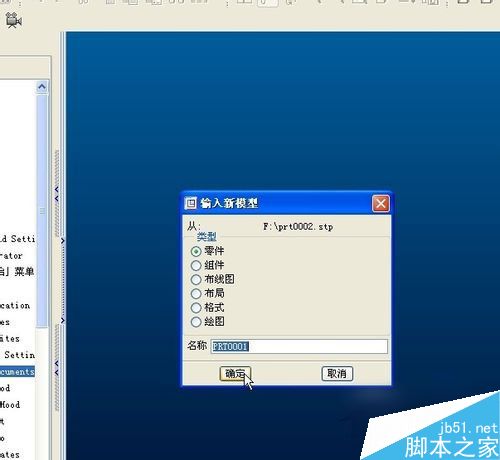
  4. 在「新模型類型」中選擇 零件
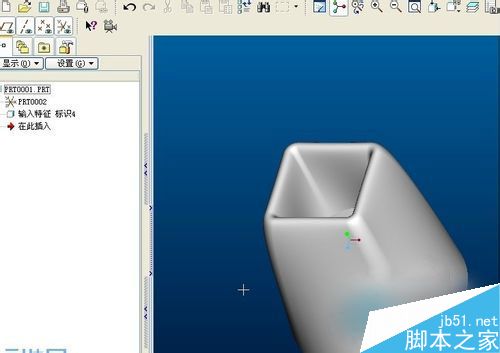
  5. 確定後即可成功載入 STP 三維模型

開啟檔案對話框

選取 STP 檔案

設定模型類型

STP 檔案開啟成功

補充說明

除 Pro-E 外,SolidWorks、CATIA、NX、Creo 等主流 CAD 軟體均支援 STP 格式匯入。若無專業 CAD 軟體,也可嘗試免費檢視器如 FreeCAD、STP Viewer 等進行基本檢視。


Copyright © Windows教程網 All Rights Reserved