Windows XP 使用者常發現 GoogleUpdate.exe 持續在背景執行,即使停用服務、移除啟動項仍會自動復活。主因是 Google 採用排程任務機制:建立 GoogleUpdateTaskMachine (使用者登入時執行) 與 GoogleUpdateTaskUser (系統閒置 10 分鐘後執行) 兩項任務。
control schedtasks)。
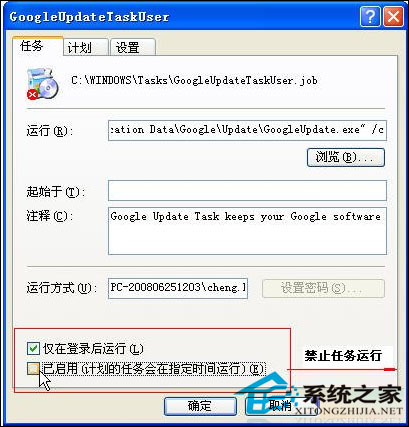
核心觀念:頑固背景程序多半透過非典型啟動管道 (排程任務、服務、WMI 事件訂閱等) 持久化。只要摸清其啟動機制,即可對症下藥徹底移除。此為本教學最想傳授的排查思維。
Win10 開機循環「您的電腦發生問題需要重新啟動」進入安全模式卸載顯卡驅動修復
Win10 Mobile 將迎來原生 Windows 10 通知同步功能,Build 1435x 以上版本支援
微軟資深專家 Mary Jo Foley 爆料:Win10 Redstone 2 將於 2017 年初發布,同期亮相 Surface Pro 5
Win7 網頁無法加入我的最愛?修復登錄表 Favorites 目錄指向即可解決
Win7 開機長鳴報警聲怎麼辦?記憶體模組鬆動/損壞排查指南
Windows 10 內建微軟拼音輸入法設定雙拼模式完整教學