Win7 瀏覽網頁時無法加入我的最愛,多因收藏夾目錄指向錯誤,修復登錄表即可:
regedit 開啟登錄表編輯器。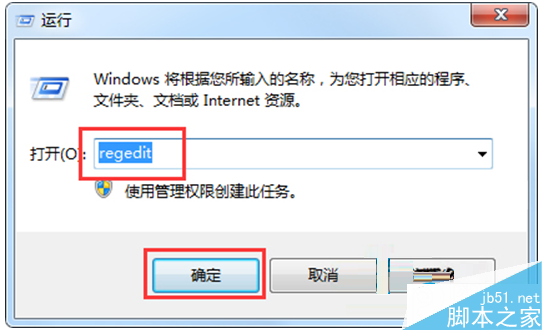
HKEY_CURRENT_USER\Software\Microsoft\Windows\CurrentVersion\Explorer\UserShell Folders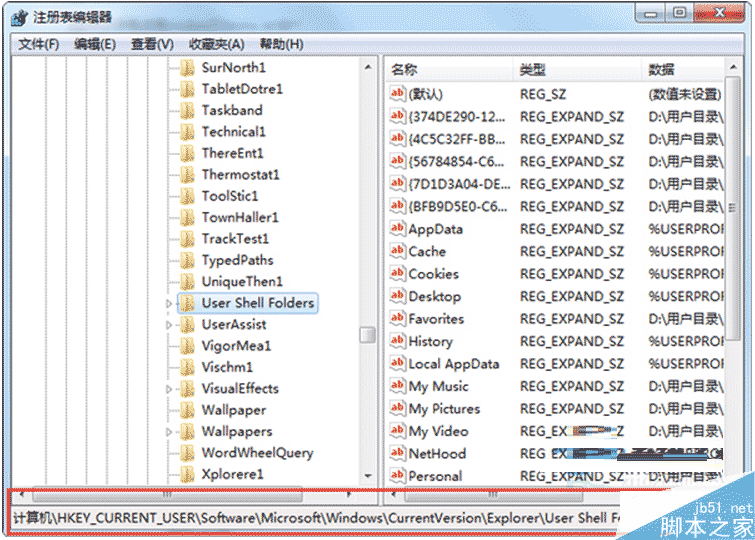
%USERPROFILE%\FAVORITES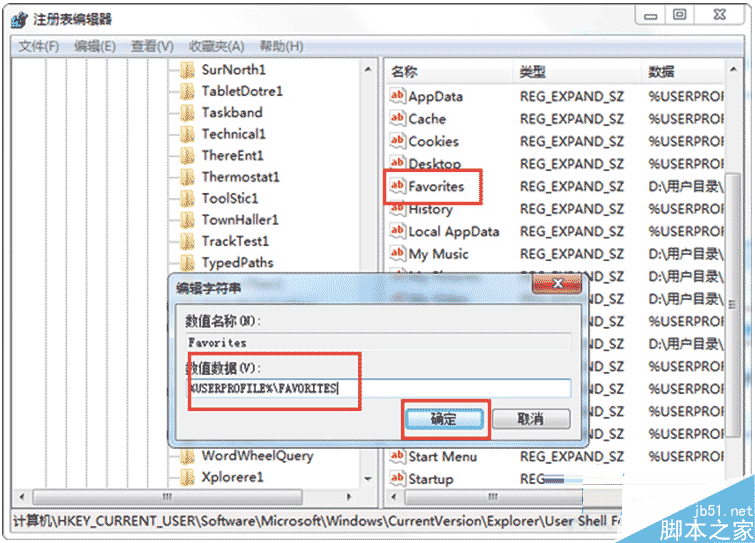
以上為 Win7 網頁無法加入我的最愛完整解決方案,操作簡單有效。
Win10 Build 10120 大量截圖曝光:安裝賣萌、半透明開始選單、Edge 新分頁、說明教學
Windows 下 XAMPP 安裝設定完整圖文教學 (Apache + MySQL + PHP + phpMyAdmin)
WinXP IE 無法開啟 Internet 站點提示 about:blank?完整修復教學
Win10 忘記本地帳號密碼?用安裝媒體離線重置密碼完整教學
Win8 Metro 應用程式自動更新關閉:商店→設定→應用程式更新→關閉自動更新
Windows 10 Build 10056 平板模式控制選項詳解