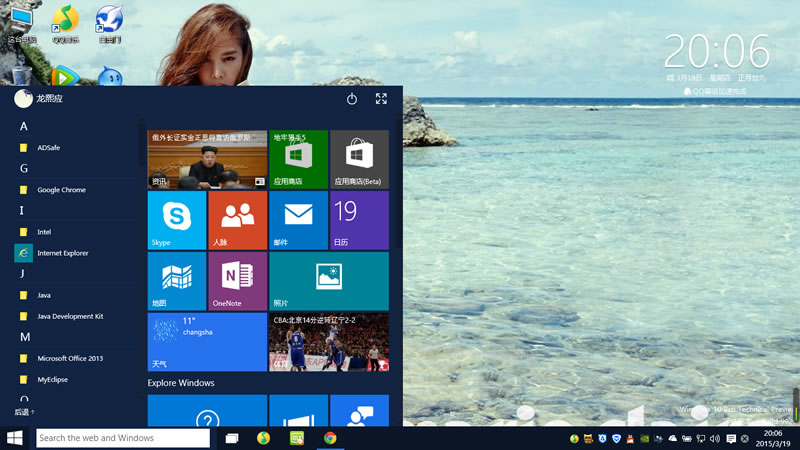
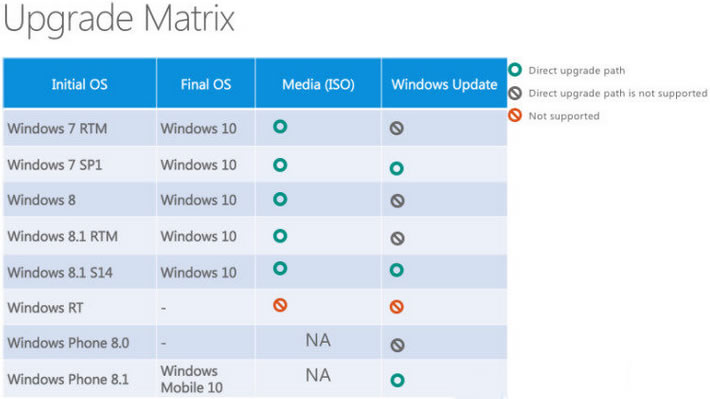
Windows 10 正式版將於夏季釋出,預覽版已可下載體驗。微軟於 WinHEC 2015 確認桌面版與行動版升級路徑:桌面版主要透過 ISO 鏡像 或 Windows Update 升級。以下為詳細升級規則與注意事項。
✅ 可直接升級至 Windows 10 的版本
- Windows 7 / 8 / 8.1 所有版本均可透過 ISO 鏡像 直接升級。
- Windows 7 SP1 與 Windows 8.1 Update (S14) 可直接透過 Windows Update 線上升級。
- 其他版本(如 Windows 7 RTM、Windows 8 RTM)需先升級至 SP1 或 S14,再行升級 Win10。
❌ 無法升級的平台
- Windows RT / RT 8.1:無法升級至 Windows 10,微軟承諾提供特殊更新補足部分功能,細節待定。
- Windows Vista / XP:不支援直接升級,需全新安裝。
行動裝置升級
- Windows Phone 8.1 可升級至 Windows 10 Mobile(官方確認)。
- Windows 10 手機版亦稱為 Windows Mobile 10。
國內輔助升級工具
- 騰訊電腦管家:提供國內下載加速、備份、一鍵還原/回滾、驅動安裝、應用安裝、客服支援,涵蓋完整升級流程。
- 360 安全衛士:同樣提供一鍵升級服務。
- 不願使用國內工具者,仍可透過微軟官方管道升級。
相關資源
- Win10 預覽版 64/32 位元鏡像下載
- Windows 10 升級助手下載與使用教學