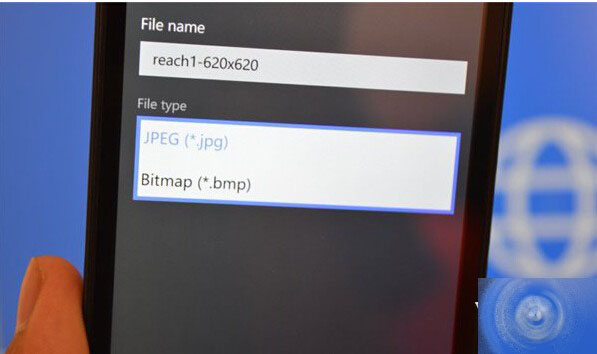
2017 年 6 月 17 日,微軟向 Windows Insider 會員推送 Win10 Mobile 預覽版 10136(快速環)。此版本以修復 Bug 與效能提升為主,但 Edge 瀏覽器新增一項實用功能:圖片另存為格式選擇。
Win10 手機版 Edge 瀏覽器新增圖片另存為功能
此版本正式移除 IE11 瀏覽器,Edge 成為唯一內建瀏覽器。傳聞 Win10 Mobile 正式版將於 9 月底釋出,屆時 Edge 將獲得更多新功能。
Win10 雙螢幕顯示設定完整教學:輕鬆實現擴展模式
Win8 應用商店錯誤 0x80080206?重置 SoftwareDistribution 修復
UEFI BIOS 環境安裝 Windows 7 完整圖文教學:關閉 Secure Boot、建立 EFI 啟動 U 碟
Win10 不斷彈出「正在安裝新鍵盤」通知?卸載百度輸入法即可解決
Windows XP 建立區域網路 (LAN) 讓多台電腦連網遊戲完整教學
Win10 周年更新常見問題彙總與解決方案(含 0x80070057、無限重啟、藍屏等)
Windows 7 關閉系統檔案保護功能:SFC 掃描修復與群組原則禁用教學
Win10 裝機版與專業版差異詳解:Ghost 封裝版 vs 正版授權