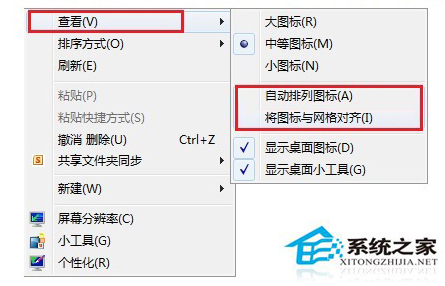
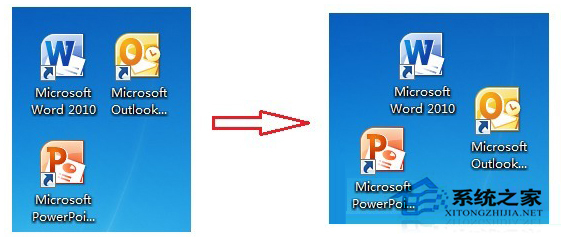
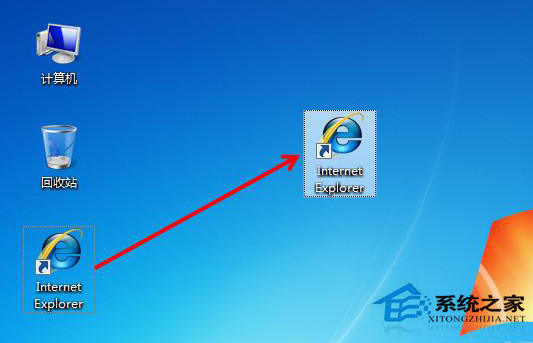
Windows 8.1 桌面預設「自動排列圖示」與「將圖示與網格對齊」,限制自由配置。桌面空白處右鍵 → 「檢視」→ 取消勾選這兩項,即可隨意拖曳圖示至任意位置,方便整理與尋找。
設定生效即時,無需重開機,適合習慣手動整理桌面佈局的用戶。
Win10 瀏覽器無法上傳圖片提示 Adobe Flash Player 不工作?啟用瀏覽器 Flash 設置或換瀏覽器
Win7 無法刪除 TrustedInstaller 擁有的系統檔案?取得完整控制權限後即可刪除
Windows 8 好用嗎?實際體驗四大優勢與適應期分析
拒絕魯大師!用 Windows 內建工具完整檢查系統健康度、修復檔案、診斷記憶體與硬碟
Win10 滑鼠無法拖曳檔案?四大可能原因與對應解法
Win7 網路位置選擇指南:家用/公司/公用三種防火牆策略差異詳解
Win8.1 升級 Win10 失敗報錯 800070005?卸載第三方殺毒軟件/安全工具即可解決
Windows 10 Mobile 週年更新 8 月 9 日推送,電信商版延至 8 月 16 日