Win10 偶發滑鼠無法拖曳檔案(無法拖移、複製),常見四大成因:
解法:連按兩次 Esc 鍵釋放鎖定,或重新啟動總管(工作管理員重新啟動「Windows 檔案總管」)。
解法:檢查接口(PS/2 需關機拔插),換 USB 埠測試,必要時更換滑鼠。
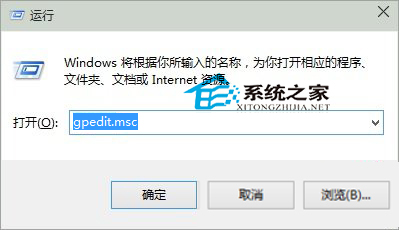
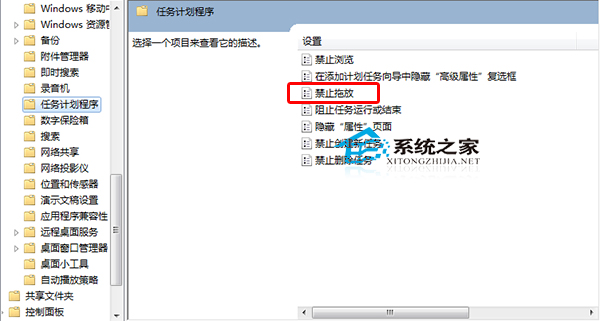
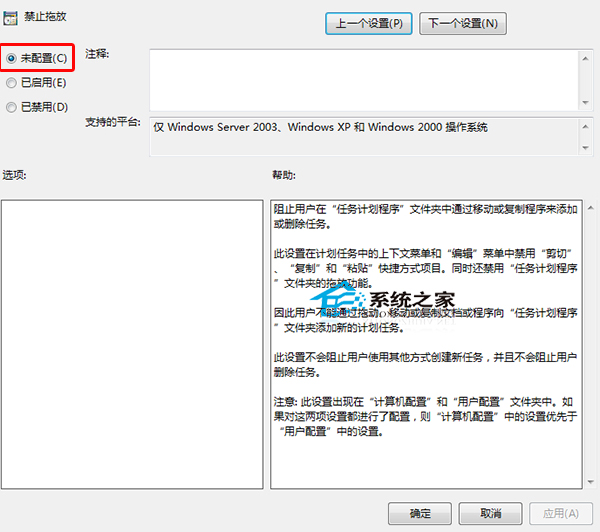
解法:
gpedit.msc
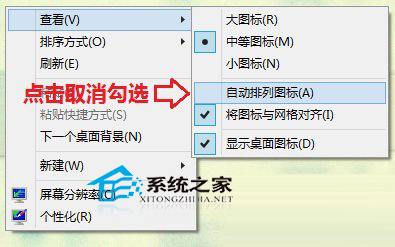
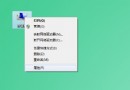
解法:桌面空白處右鍵 → 「檢視」 → 取消勾選「自動排列圖示」。
原因一、四最常見,建議優先嘗試。重開機也是通用快速解法。
Win10 RS1 預覽版 11099 更新內容:統一核心架構重構 穩定性提升
Windows 10 WSClient.dll 錯誤三大修復方案:系統檔案修復、線上修復、重設應用商店
Windows 7 環境變數設定完整教學:Path 變數編輯、新增 Java Home、系統與使用者變數差異
Win10 Build 9879 官方中文 ISO 鏡像下載與安裝教學 (虛擬光碟/隨身碟/硬碟安裝)
Windows 7 內建磁碟管理:無損調整分區、建立新磁區完整圖解
Win7 任務列釘選資料夾捷徑提升效率:改副檔名法圖文教學
Win7 透過 BIOS 設定預防開機區病毒?啟用 Boot Sector Virus Protection
Windows 7 絕對不能關閉的 6 大核心服務清單(附風險說明)