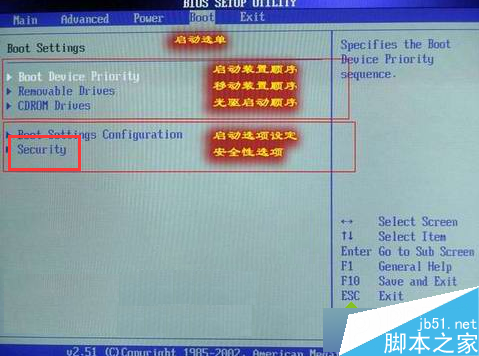
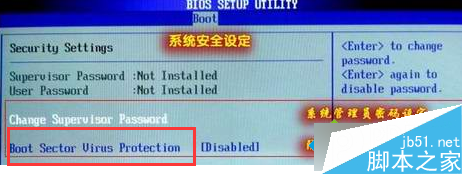
BIOS 內建「開機區病毒防護」功能,啟用後可在開機階段偵測/阻擋開機區病毒寫入,提升系統安全性。
此為硬體層面防護,配合作業系統防毒軟體可構建多層防禦,建議啟用以預防開機區病毒破壞系統啟動。
騰訊、360 搶灘 Win10 免費升級入口:誰能贏得中國用戶青睞?
Win10 10158 簡體中文專業版 64位 ISO 鏡像下載(內建軟媒魔方優化工具)
盜版升級 Windows 10 後仍屬非正版,每小時黑屏一次?微軟詳細說明授權狀態與風險
關閉 Windows 安全性中心警示彈窗:停用 Security Center 服務與防火牆
升級 Win10 14295 後滑鼠跳動、異音?禁用 TPM 維護任務暫時緩解
Win10 UWP「電影與電視」預覽版更新:新增永遠全螢幕播放選項
Win7 資源回收筒右鍵選單缺少「內容」選項?群組原則啟用即可恢復
Win10 滑鼠右鍵回應緩慢?清理 ContextMenuHandlers 登錄項加速選單彈出