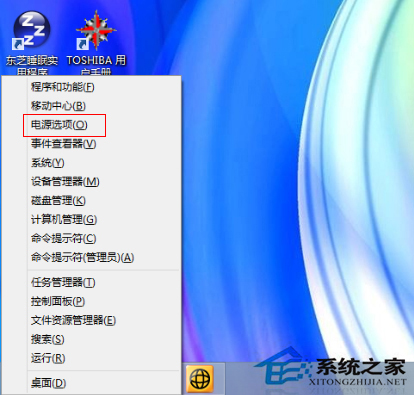
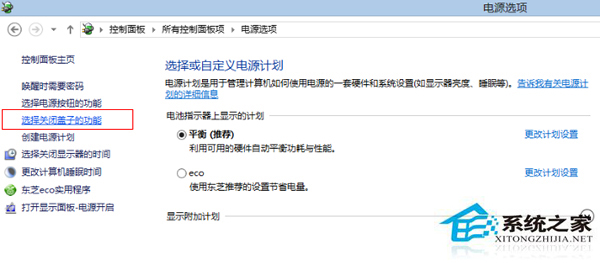
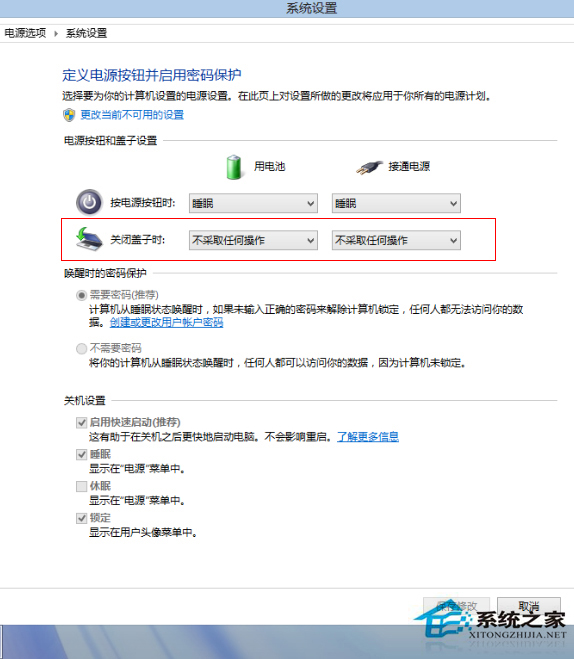
Win8 筆電預設開蓋即開機,造成不知情耗電。取消方法:
許多用戶不需要自動開機,依此設定即可停用。
Win 10 Edge 瀏覽器開發平台將迎來大量新特性:CSS 偽類、表單元素、WebRTC 等
Windows 7 重灌系統教學:虛擬光碟機掛載 ISO 安裝
Windows 8 更新補丁後進入系統黑屏?安全模式還原系統修復
Win10 10158 註冊綁定會員版教學:免費使用一年、接收會員版本更新
Win8 Metro 介面磁貼分組命名教學:讓開始畫面井井有條
Windows 7 系統備份與還原點建立完整操作指南
Win10 安裝失敗缺少 boot.wim?複製 $Windows.~BT 到其他分區執行 setupre.exe
Win7 隱藏資料夾完整教學:屬性隱藏屬性 + 資料夾選項不顯示隱藏檔