Win10 應用程式商店開啟提示「伺服器發生錯誤」,錯誤碼 0x80072EFD 通常為 IE 代理設定導致;錯誤碼 0x800706d9 則多與防火牆服務未啟用有關。提供完整排查步驟。
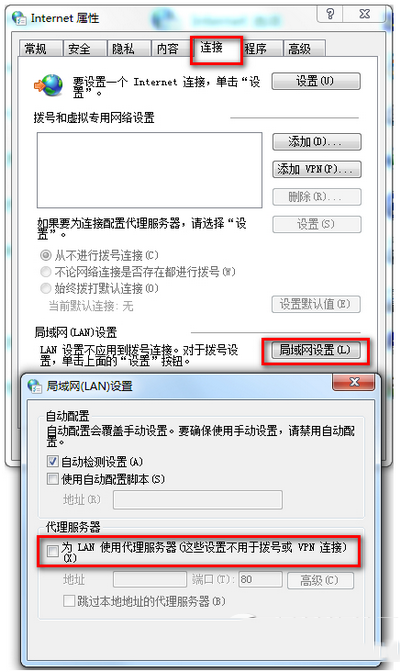
錯誤 0x80072EFD:IE 代理設定
- 開啟 IE → 「網際網路選項」→ 「連線」→ 「區域網路設定」。
- 取消勾選「為 LAN 使用 Proxy 伺服器」。
- 無需 VPN 即可解決。
錯誤 0x800706d9:防火牆與網路共用服務
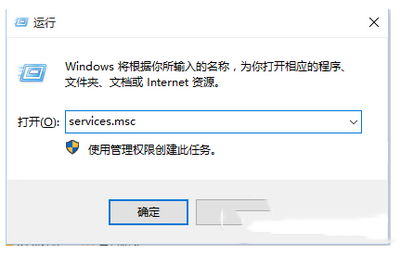
- Win + R →
services.msc。
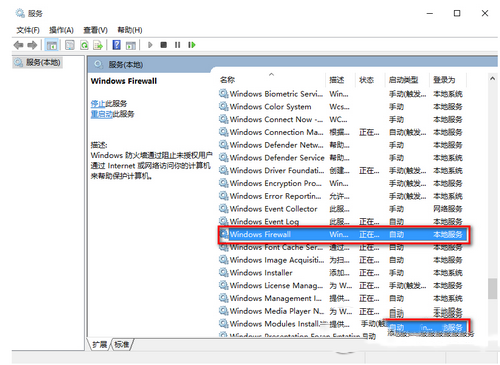
- 確認 Windows Firewall 與 Internet Connection Sharing (ICS) 皆為「執行中」,啟動類型設為「自動」。
- 若未執行,右鍵「啟動」,並檢查啟動類型。
臨時性問題
取消安裝 → 重新下載安裝,部分情況為伺服器端暫時性錯誤。