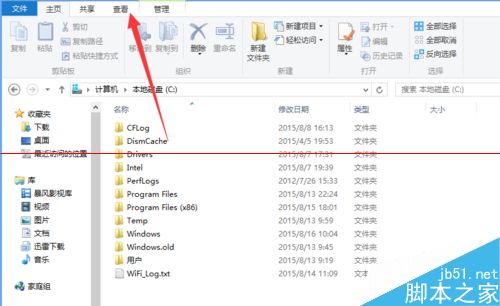
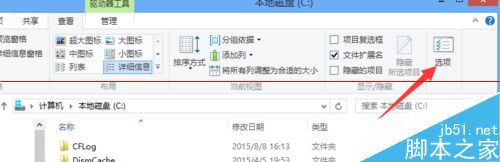
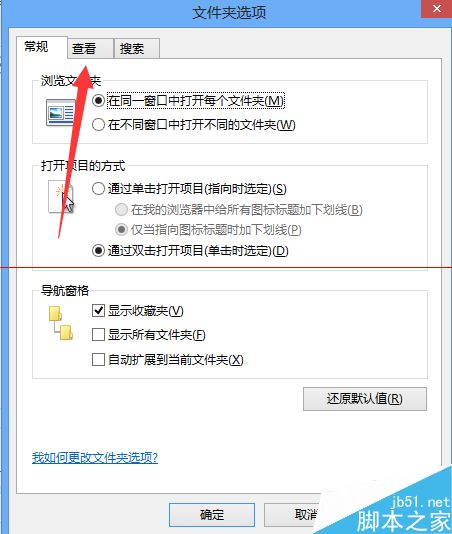
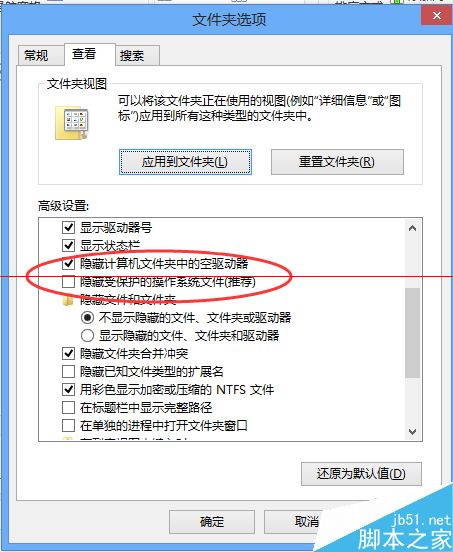
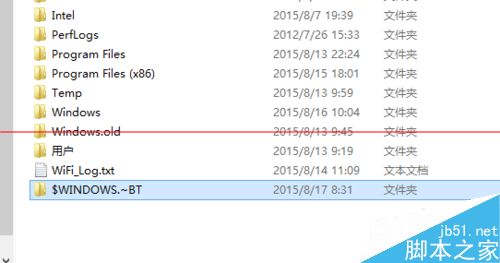
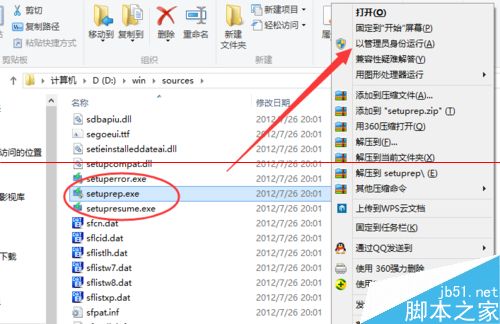
升級 Win10 時出現「Windows 找不到所需安裝檔案 boot.wim」或錯誤碼 0x80240020,通常是 $WINDOWS.~BT 隱藏資料夾遺失或損壞。解決步驟:
0x80240020
$WINDOWS.~BT
sources
SetupRep.exe
Win7 工作排程器在哪?兩種快速找到並開啟方法
Win7/Win8.1 升級 Win10 後 Office 2013 文件無法開啟:修復安裝或執行 icacls 指令
Win10 升級提示怎麼關閉?解除安裝 KB3035583 並刪除 GWX.exe 兩步驟徹底移除
Windows 8 全面解析:Metro 介面、觸控優化、核心新特性與版本差異
Win8.1 修改 DNS 伺服器避開 ISP 劫持/攔截 (Google/114/OpenDNS 等公共 DNS)
Win7 設定 ADB 環境變數完整圖文教學:解決「adb 不是內部或外部命令」錯誤
Windows Server 2008 R2 開啟 Aero 桌面主題方法
Windows 10 內建截圖工具 (Win+Shift+S/截圖工具) 失效無法儲存?修正圖片庫儲存路徑教學