透過 PowerShell 移除損壞的應用程式套件,再從 Microsoft Store 重新安裝即可修復同步問題。
開始功能表搜尋「PowerShell」 → 右鍵 → 「以系統管理員身分執行」。
在視窗中輸入以下指令並按 Enter:
Get-appxprovisionedpackage –online | where-object {$_.packagename –like "*windowscommunicationsapps*"} | remove-appxprovisionedpackage –online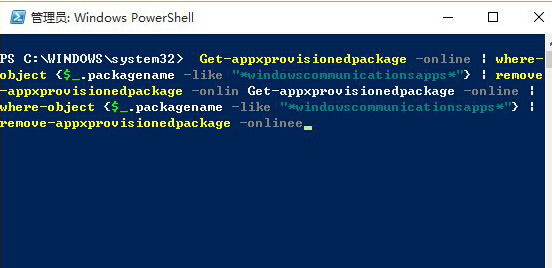
指令執行完成後,開啟 Microsoft Store 搜尋「郵件和行事曆」重新下載安裝。
此方法可修復因應用程式套件損壞導致的同步失敗問題。
Win8 應用商店/現代應用閃退?重建使用者設定檔 + 修改登錄表 ProfileImagePath 徹底修復
Windows 3 大隱藏神技:加速開機、加快瀏覽、查詢記憶體上限,全靠系統內建工具
Windows 7 群組原則打不開「MMC 無法建立管理單元」修復教學
Win10 預覽版 10565 官方 ISO 鏡像下載彙總 (32/64 位)
Windows Server 2003 15 招實用操作技巧:釋放空間、加快關機、優化播放、關閉安全提示、提升反應速度
Windows Server 2008 R2 修改 hosts 檔案三種方法:覆蓋、管理員記事本、批次檔