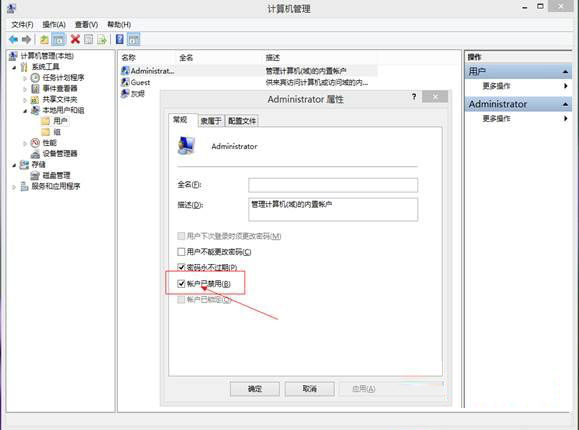
Windows 8/8.1 現代應用 (Metro/UWP) 啟動即閃退、無法使用,主因是使用者設定檔損毀、登錄表 ProfileImagePath 指向錯誤路徑**。本文提供「啟用內建 Administrator → 重命名舊設定檔資料夾 → 修改登錄表 ProfileImagePath → 還原原帳號」的標準修復流程。
C:\Users → 將原帳號資料夾(如 chenjun)重命名為 chenjun_old。regedit → 定位 HKEY_LOCAL_MACHINE\SOFTWARE\Microsoft\Windows NT\CurrentVersion\ProfileList → 找到 ProfileImagePath 指向 C:\Users\chenjun 的 SID 分支 → 修改為 C:\Users\chenjun_old。
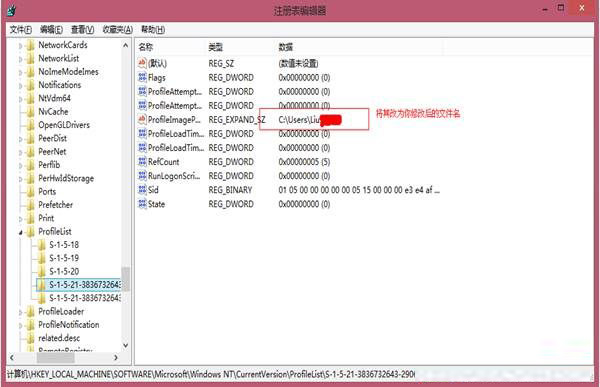
chenjun_old 手動複製回 chenjun(系統會自動建立新資料夾)。Win8/8.1 應用閃退 90% 為使用者設定檔與登錄表路徑脫鉤導致。上述流程屬標準修復手冊,操作謹慎、備份完整下成功率極高。Win10 同理可用此思路(對應 ProfileList 機制相同)。