透過命令提示字元關閉休眠功能再重新開啟,可修復喚醒後的存取權限問題。
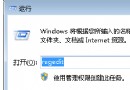
按 Win + R → 輸入 cmd → 在命令提示字元輸入 powercfg -h off 按 Enter。
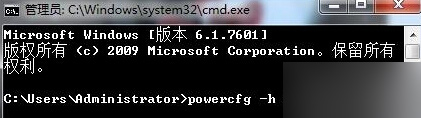
重新開機後,再次以系統管理員身分開啟命令提示字元。
輸入 powercfg -h on 按 Enter,重新啟用休眠。
完成上述步驟後,睡眠喚醒的「拒絕存取」問題通常即可解決。
Windows 7 IIS 安裝與設定完整圖解:ASP 網站部署、連接埠綁定、多站點建立
Windows 8 如何變更檔案歷程記錄儲存磁碟機?外接硬碟與網路位置完整設定教學
Win10右鍵菜單WinRAR選項過多?一鍵合並為級聯菜單讓介面清爽
Win10 內建 Hyper-V 虛擬機無法上網?建立外部虛擬交換機完整設定圖解
Windows 10 系統實測評測:新開始選單、多工作業、觸控體驗與升級建議
Win10 Build 10000 編譯完成:版本號突破萬大關,今晚發布會將推新技術預覽版與手機版首測