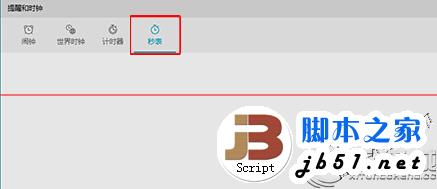
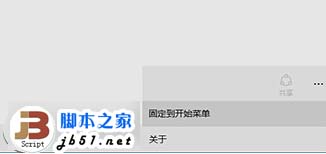
Windows 10 內建「鬧鐘與時鐘」應用包含碼錶、計時器、鬧鐘、世界時鐘功能。可將碼錶釘選到「開始」選單,單擊磚即可快速啟動。
完成後,「開始」選單右側磚區將出現「碼錶」磚,點擊即可直接開啟碼錶介面,方便運動計時、實驗記錄等場景使用。
微軟強烈建議:Win10 勿裝第三方隱私保護工具,內建設定即可完整管理權限
Windows 10 無法關機/重開機?四種替代關機方法快速解決
Win10 玩英雄聯盟(LOL)閃退崩潰?資料夾權限修正徹底解決
微軟確認:盜版 Windows 也能免費升級 Win10,但桌面會顯示水印提醒購買正版
用戶吐槽 Win 10 亮度調節不如 Win 8.1 靈活:Modern 介面僅支援 25% 階梯調整,傳統滑桿藏在電源選項
Win10 高分屏 DPI 縮放字體模糊兩大解決方案:工具法與登錄表法
Win10 如何徹底停用 Cortana 小娜?群組原則 (專業版) 或 登錄 (家庭版) 兩法完整禁用
Win7 可移動磁碟無法開啟?掃描修復、chkdsk 指令、低階格式化三大解法