早期洩露的 Build 9901 曾出現全新鎖定畫面設計,正式推送的 Build 9926 雖包含該功能但預設關閉。以下步驟可手動啟用。
regedit
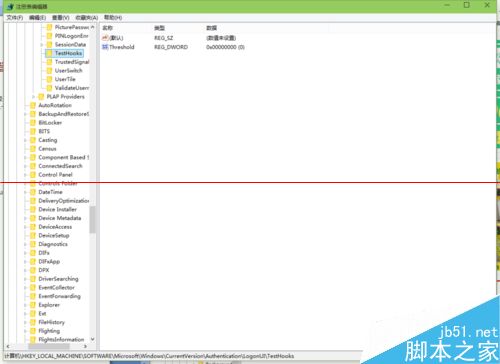
HKEY_LOCAL_MACHINE\SOFTWARE\Microsoft\Windows\CurrentVersion\Authentication\LogonUI\TestHooks
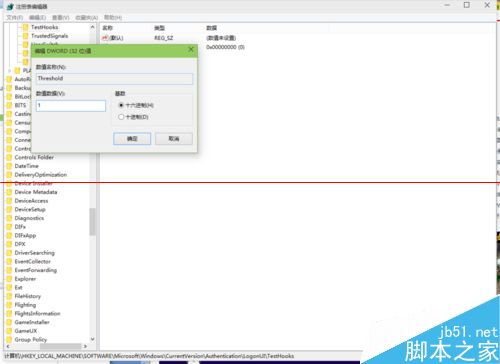
0
1
explorer.exe
Win7 系統備份如何把 D/E/F 槽也識別為系統槽備份?隱藏磁碟機代號法完美解決
Windows 8 內建虛擬光碟機:ISO 掛載/卸載零軟體
Win8 開始畫面磚貼重新命名技巧:透過檔案位置間接修改
盜版系統升級 Win10 會黑屏?五大解決方案完整分析
7 分鐘回顧 Win10 發布會重點:全息眼鏡、Surface Hub、Spartan 瀏覽器、Cortana 上桌面
Win10 快速存取釘選資料夾:一鍵固定常用深層目錄到快速存取與檔案選單
Windows 10 重置系統釋放 C 槽空間完整教學
Windows 8 未啟用狀態下修改使用者帳號圖片(替換系統預設頭像檔)