Win7 開機顯示器無訊號兩大原因與解法:
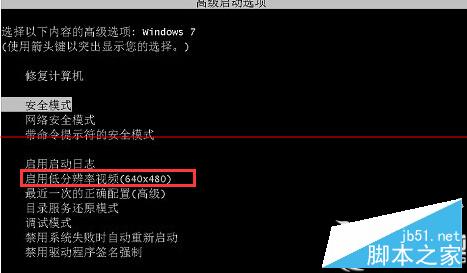
先試低解析度模式,無效再處理驅動問題。
Win10 Mobile/PC 預覽版 14951:修復內容與已知問題完整彙整
Win10 如何設定檔案預設開啟方式?右鍵選擇「選擇其他應用程式」並勾選預設即可
升級 Win10 後如何重新安裝(乾淨安裝)?5 大流程與注意事項:確認激活、下載 ISO、備份資料、USB 開機、聯網自動激活
Win10 正式版啟用暗黑主題技巧:使用 .theme 檔案快速套用 AllDarkEveV2 風格
Windows 10 激活方法圖解:金鑰輸入與 KMS 工具備案
關閉 Windows Server 2012 IE 增強式安全性設定 (IE ESC)