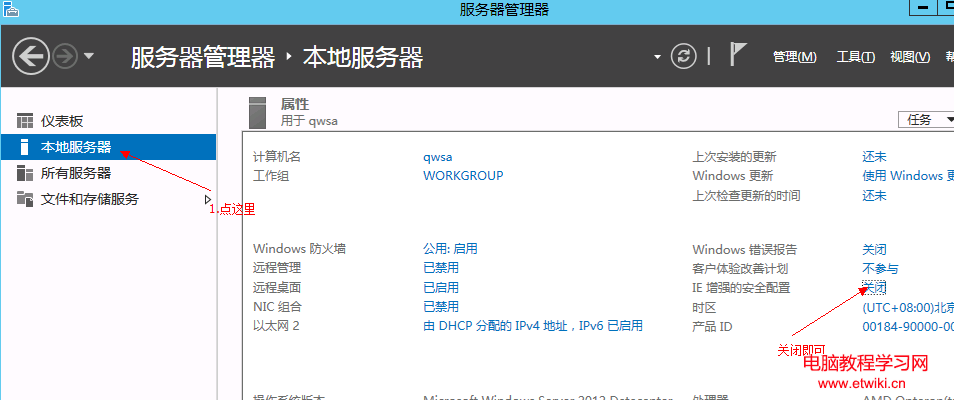
Windows Server 預設啟用 IE 增強式安全性設定 (IE ESC),瀏覽網頁頻繁彈出提示要求加入信任網站,影響操作效率。關閉步驟如下:
關閉後即可正常瀏覽網頁,無需逐一加入信任清單。
Windows 7 建立 PPTP VPN 連線完整圖文教學:從新增連線到撥號登入
Win8 還原隱藏更新:控制面板 Windows Update 介面操作
Win10 查看打印機 IP 地址圖文教程:打印機面板操作、路由器客戶端、CMD 命令三法合一
Win10 以新視窗開啟資料夾,雙視窗並列大幅提升檔案操作效率
Win7 聽音樂看影片突發爆音雜音?登錄刪除 MMCSS 解決多媒體服務優先級衝突
Win10 Build 9860 僅透過 Windows Update 推送,不提供 ISO 鏡像下載,大小約 2-2.7GB
Win8 自訂檔案總管導覽窗格 隱藏網路、家庭群組、程式庫等項目
Win10 正式版大量蒐集隱私?九大類設定教你徹底阻止追蹤