Windows XP Windows 7 Windows 2003 Windows Vista Windows 綜合教學 Linux 系統教學
Windows 10 Windows 8 Windows 2008 Windows NT Windows Server 電腦軟體教學
您现在的位置: Windows教程網 >> Windows教程 >  >> Windows 綜合教學 >> 關於 Windows

Win10 Mobile 單手模式使用教學與 iOS Reachability 對比

編輯:關於 Windows

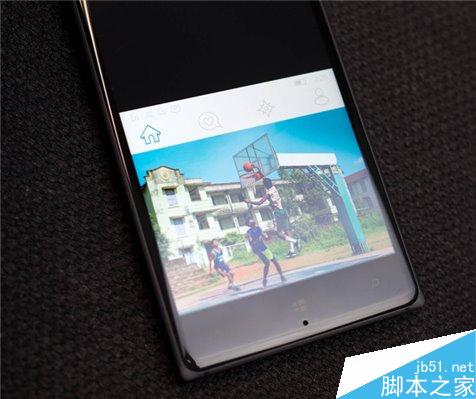
Win10 Mobile 10536.1004 版起全機型支援單手模式,長按 Windows 鍵即可啟動,螢幕內容下移方便單手操作頂部介面。本文說明操作方式並與 iOS Reachability 對比。
Win10 Mobile 單手模式操作

  1. 長按 Windows 鍵 啟動單手模式,螢幕內容整體下移。
  2. 單手即可觸達螢幕頂部選單、通知中心等介面。
  3. 點擊上方黑色空白區域,或靜待 7-8 秒自動恢復正常模式。

早期僅 5 吋以上螢幕支援,現已開放全機型使用。

與 iOS Reachability 對比

項目Win10 MobileiOS (Reachability)
啟動方式長按 Windows 鍵輕觸兩下 Home 鍵(非按壓)
視覺效果上方純黑背景上方模糊背景,保留桌面牆紙質感
恢復方式點擊黑色區 / 等待自動恢復再次輕觸 Home 鍵 / 等待自動恢復

改進建議

  • 上方純黑背景缺乏美感,建議加入模糊牆紙或漸層效果。
  • 大螢幕機型可參考三星 Note 5,支援左右側邊移動,保留完整操作區域。

單手模式讓大螢幕手機單手操作更輕鬆,期待後續版本優化視覺與交互體驗。

Copyright © Windows教程網 All Rights Reserved