部分追求桌面美觀的使用者無法忍受圖示文字下的虛線選取框。在 Windows 7 中,透過「效能選項」啟用「在桌面上為圖示標籤使用陰影」即可隱藏虛線框,讓桌面更簡潔。
1. 右鍵點選「電腦」 → 「內容」 → 左側「進階系統設定」 → 「進階」頁籤 → 「效能」區塊的「設定」。
2. 在「視覺效果」頁籤勾選「在桌面上為圖示標籤使用陰影」 → 「確定」套用並關閉所有視窗。
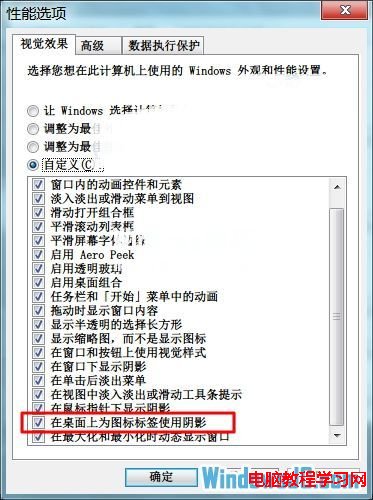
設定完成後,桌面圖示文字將不再顯示虛線選取框,改以陰影效果呈現,視覺更清爽。
Win10 10547 修復 Hyper-V 安裝問題:Gabriel Aul 確認虛擬化功能恢復正常
Win7/Win8.1 升級 Win10 後睡眠功能消失?群組原則啟用待機 (S1-S3) 修復教學
Win7 修改開機密碼最快捷徑:Ctrl+Alt+Delete 一鍵直達
Win10 安裝 .NET Framework 3.5 失敗 0x80070003?登錄表殘留帳戶資料是主因
XP 系統跨網段共享印表機:編輯 hosts 檔 + 新增網路印表機實現 192.168.1.x 訪問 192.168.2.x 印表機