Windows XP Windows 7 Windows 2003 Windows Vista Windows 綜合教學 Linux 系統教學
Windows 10 Windows 8 Windows 2008 Windows NT Windows Server 電腦軟體教學
您现在的位置: Windows教程網 >> Windows教程 >  >> Windows 綜合教學 >> 關於 Windows

Windows 7 關閉或解除安裝 Windows Search 索引服務

編輯:關於 Windows

Windows Search 提供強大的檔案搜尋功能,但會在背景建立索引佔用資源,部分使用者希望關閉或移除。本文說明如何暫停服務、停用啟動類型,或徹底解除安裝 Windows Search 功能。

方法一:停用 Windows Search 服務

1. 開啟「控制台」 → 「系統管理」 → 「服務」。
2. 找到「Windows Search」 → 雙擊 → 「啟動類型」改為「手動」或「停用」 → 「停止」服務 → 「確定」。
若需重新啟用,將啟動類型改回「自動」並重新啟動電腦即可。
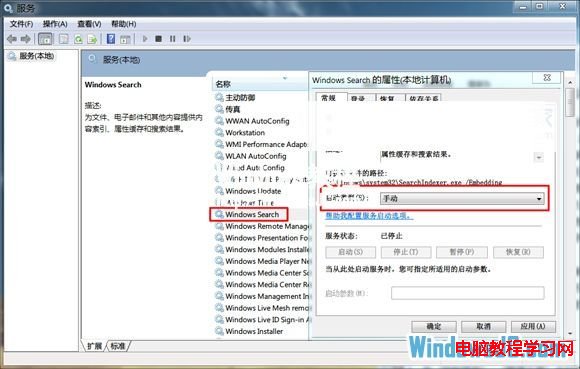
服務管理員停用 Windows Search

方法二:解除安裝 Windows Search 功能

1. 開啟「控制台」 → 「程式和功能」 → 左側「開啟或關閉 Windows 功能」。
2. 取消勾選「Indexing Service」(索引服務)與「Windows Search」 → 「確定」。系統將移除相關元件。
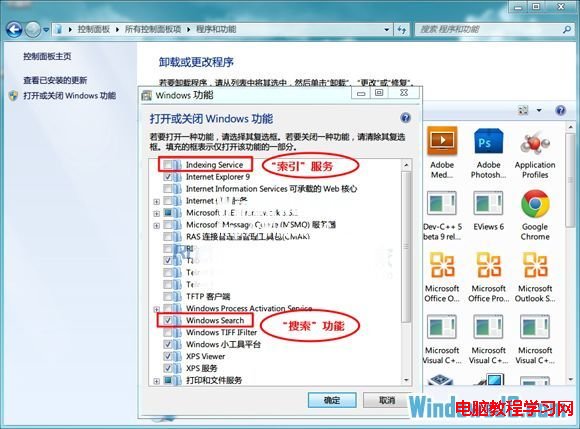
關閉 Windows 功能移除 Search

提示:若仍保留基本搜尋功能,建議僅取消勾選「Indexing Service」,保留「Windows Search」。

Copyright © Windows教程網 All Rights Reserved