Windows 7 內建的 Windows DVD Maker 可輕鬆將照片、影片製作成 DVD 影集,無需安裝第三方軟體。本文示範匯入素材、設定 DVD 選項與燒錄的基本流程。
1. 開啟 Windows DVD Maker → 選擇「加入相片和影片」 → 「下一步」。
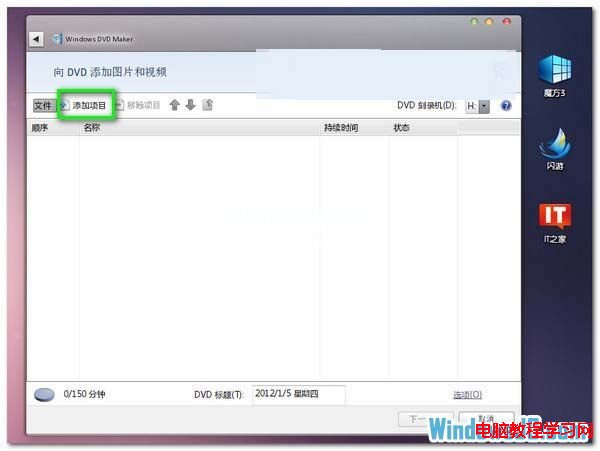
2. 點選「加入項目」 → 選取照片/影片檔案(可按 Ctrl 多選) → 「加入」。
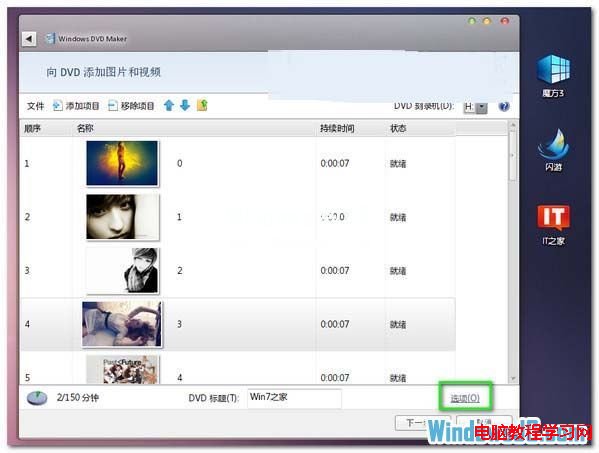
3. 點選「選項」設定 DVD 播放模式、長寬比、影片格式、燒錄速度與暫存檔位置 → 「確定」。
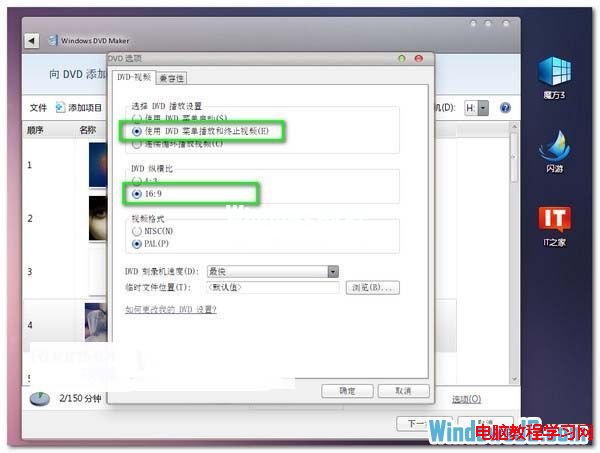
4. 確認素材順序無誤後點選「下一步」選擇選單樣式,最後插入空白 DVD 點選「燒錄」即可完成製作。
Win10 Mobile 周年更新 14393.105 今日推送發布預覽通道,版本號顯示 103 實為 105
Win7 如何新增「列印目錄」右鍵功能?Printdir.bat + SendTo 選單一鍵列印資料夾清單
Win10 預覽版 14257 更新後出現哪些 Bug?核心問題:禁止使用「重置此電腦」
Win10 Build 9879 隱藏任務列搜尋框,登錄表啟用教學
Win7 顯示檔案副檔名(擴充名)識別檔案類型:資料夾選項一鍵設定
Win10 找不到 IIS 管理員捷徑?C:\Windows\System32\inetsrv\InetMgr.exe 發送到桌面