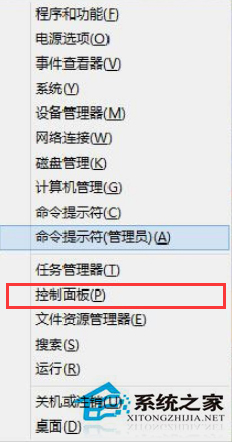
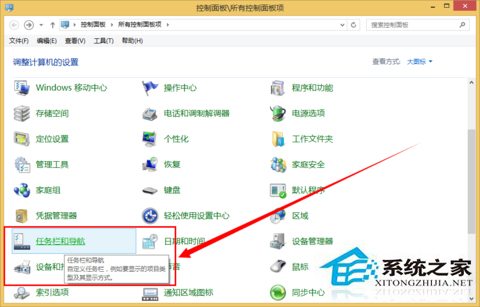
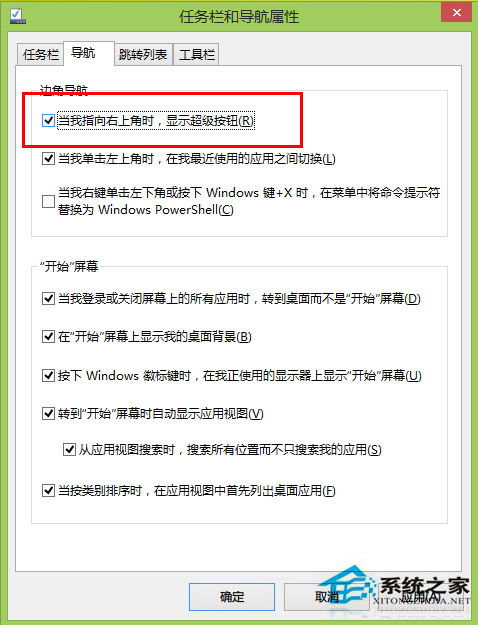
Win8/8.1 滑鼠移至右上/右下角會彈出 Charms Bar(搜尋、分享、設定等),易誤觸發。關閉方法:
需要時重新勾選即可恢復。此功能亦稱「超級選單」或「邊角導航」。
Win8 安裝軟體錯誤代碼 2502 兩種解決辦法
找回 Windows 8 Metro 開始畫面遺失的應用程式商店磚
Win7 加快工作列縮圖預覽切換速度:登錄表新增 ThumbnailLivePreviewHoverTime
Win8 無開始選單怎麼找控制台?從所有應用清單進入
Windows 8 安裝與使用 Bitcoin Miner 比特幣挖礦客戶端完整教學
WinXP 開機自動檢測磁碟 (chkdsk) 取消與根治五大實用技巧
Win7 徹底關閉自動升級 Win10 提示:本地群組原則禁用「透過 Windows Update 升級至最新版本」
Win10 安裝搜狗輸入法完整教學:官網下載 v7.8、取消廣告選項、Ctrl+Shift 切換